

If you’ve done any iOS development, you’ve heard these acronyms. They come up in SwiftUI architecture discussions, in code reviews, and in almost every job interview. And for a long time, I just accepted them as the patterns you’re supposed to know.
When I moved to SwiftUI, I started wondering how much of this still applies. Most of these patterns were created for UIKit, some even for completely different platforms. SwiftUI works very differently. So I went through them one by one and asked myself what problem each pattern was solving, and whether I still have that problem in SwiftUI.
This post is what I came up with (my personal take that can also vary depending on the individual project requirements).
What iOS Architecture Patterns Have in Common
Before comparing them, it helps to look at what they have in common. Every one of these patterns is a way of sorting your code into buckets.
Think of a wardrobe. You could throw all your clothes onto one pile, but getting dressed would be painful. So you sort them: one shelf for shirts, one for pants, a drawer for socks. Architecture patterns do the same thing for code. They give you a place for UI, a place for state and logic, and a place for data.
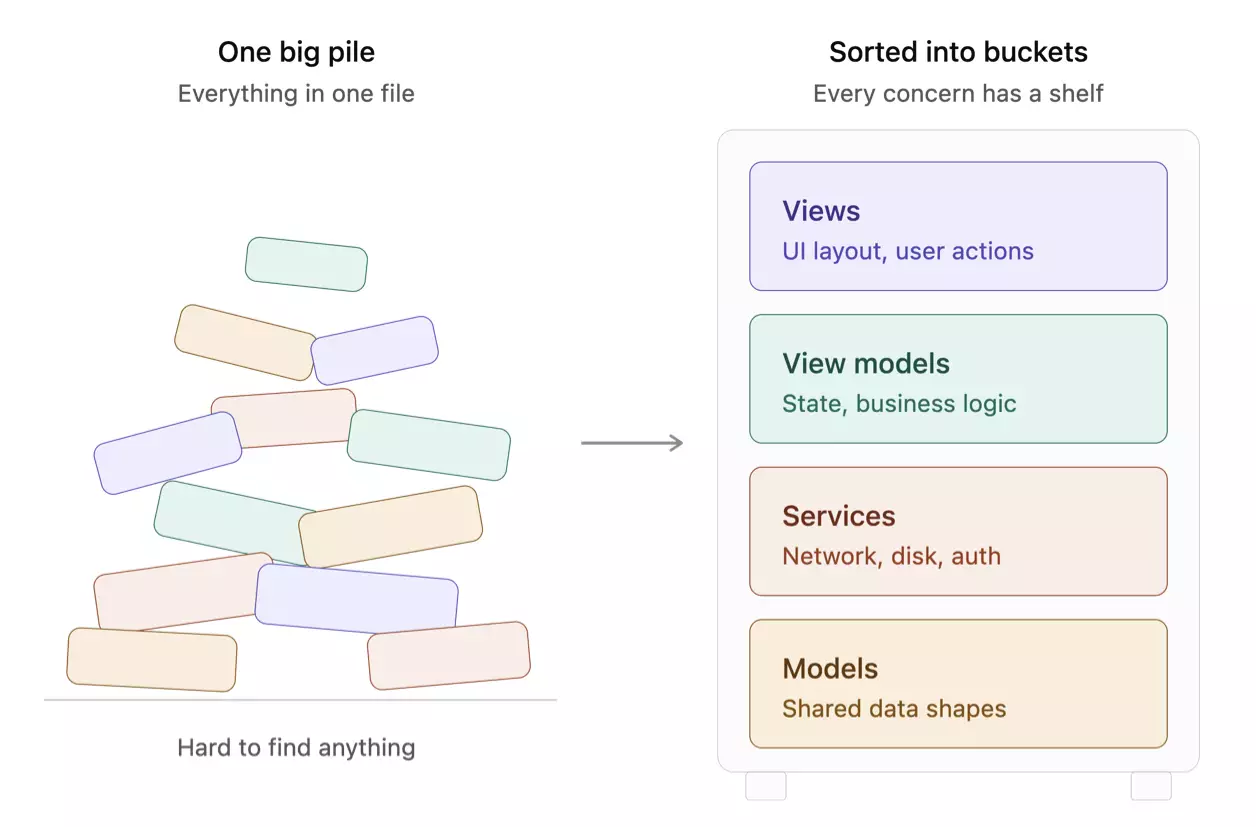
When I compared the patterns, I noticed that they all have a model and a view. The differences are in the layers between them, and in what I call the plumbing: how those layers talk to each other. Delegates, NotificationCenter, Combine, or bindings built into the framework.
That plumbing turned out to be the key to figuring out which patterns still matter.
MVC (Model-View-Controller): Why SwiftUI Doesn’t Need a Controller
MVC was Apple’s pattern for UIKit, and it’s built around the UIViewController. The controller sits between the model and the view and does most of the plumbing. It connects outlets, listens for data changes, and tells the table view to reload.
The problem with MVC is well known. The controller tends to collect everything, and you end up with what people jokingly call the “Massive View Controller.”
When I looked at MVC from a SwiftUI perspective, I noticed that the controller’s main job doesn’t exist anymore. SwiftUI updates the UI automatically when your state changes. There are no outlets to connect and no table view to reload. The framework does the work the controller used to do.
So for SwiftUI, MVC isn’t really relevant anymore.
MVP (Model-View-Presenter)
MVP replaces the controller with a presenter. The presenter holds the logic, and the view stays passive: it only displays what the presenter tells it to display. In UIKit this was popular for testability, since you could test the presenter without any UI.
But MVP is also mostly about plumbing. The presenter pushes updates into the view manually. In SwiftUI, the view reads state and updates itself, so that manual connection is exactly what SwiftUI removed.
I don’t see a reason to use MVP in SwiftUI either.
VIPER: Too Much Ceremony for Most SwiftUI Apps
VIPER splits each screen into five layers: view, interactor, presenter, entity, and a layer for navigation. It was designed for large UIKit apps and comes with a lot of ceremony. Every layer has protocols, and there are strict rules for how the layers connect.
I spent a bit longer on VIPER, because it does solve real problems. In big teams, that ceremony gives consistency: every screen is built the same way, and everyone knows where things go. That’s valuable.
But when I looked at how much of that ceremony exists to manage UIKit’s plumbing, the answer was: a lot. In SwiftUI, much of it becomes overhead. For most SwiftUI apps, VIPER is too heavy.
MVVM (Model-View-ViewModel): The Natural Fit for SwiftUI
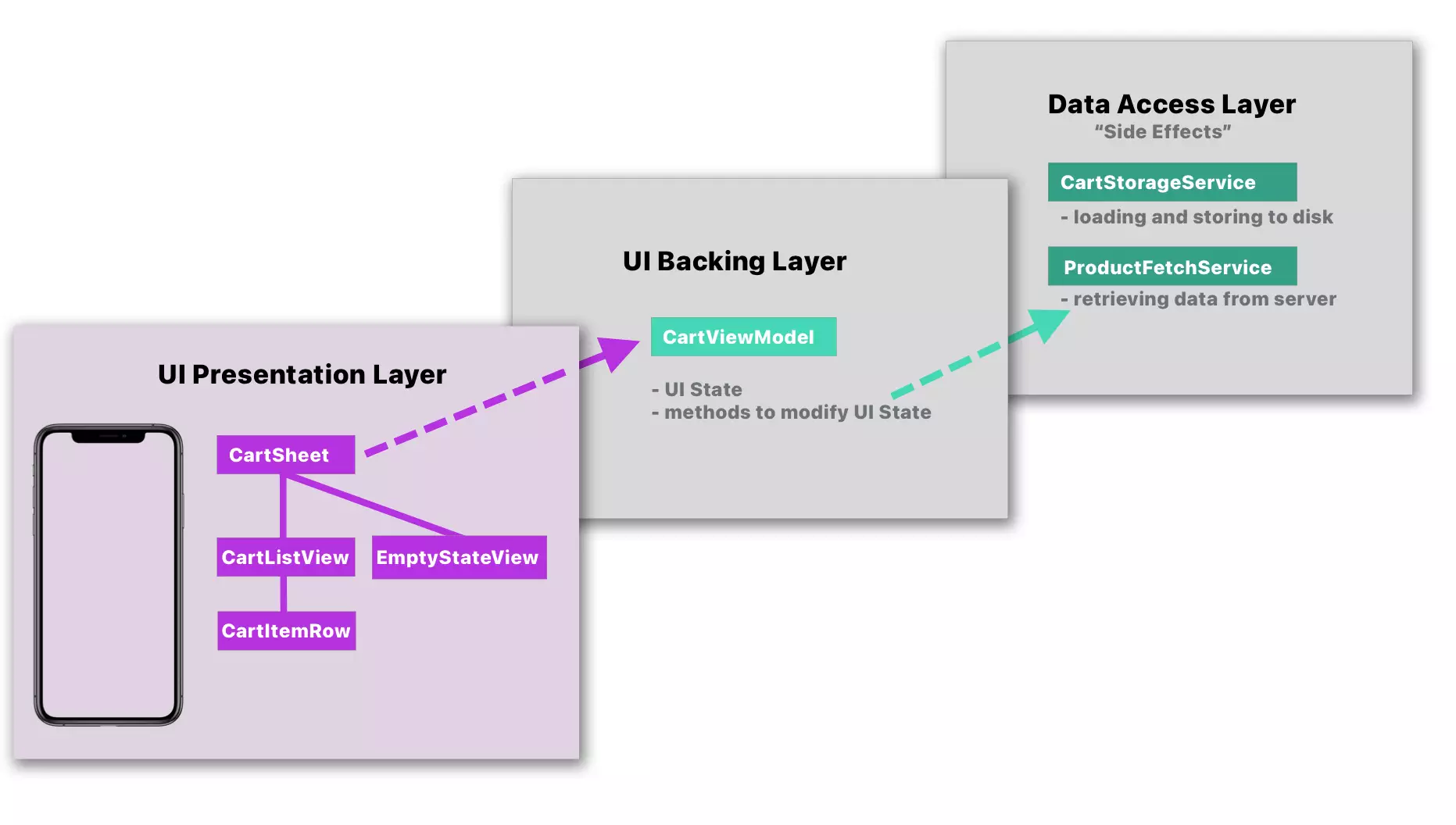
MVVM was created by John Gossman at Microsoft in 2005 for WPF. It splits a screen into three buckets: the model for the data, the view for the UI, and the view model as the layer backing the UI, holding its state and logic.
That’s how I use it in SwiftUI. A view can handle simple state and logic on its own, like a toggle with @State or a quick action on a button tap. But when the logic gets too complex, with network calls, loading and error handling, and state that changes in several ways, it doesn’t belong in the view anymore. That’s the point where I move it out into a view model that backs the UI, and the view goes back to layout and forwarding user actions. SwiftUI makes this split easy, because with @Observable the view reads the view model’s properties and updates automatically, without any extra plumbing.
As long as the logic in a view stays simple, I keep it there. I add a view model when the complexity calls for it, not by default for every screen.
MVC vs MVP vs MVVM vs VIPER: Side-by-Side Comparison
| Pattern | Layers | Made for | Relevance in SwiftUI |
|---|---|---|---|
| MVC | Model, View, Controller | UIKit | Low, SwiftUI does the controller’s job |
| MVP | Model, View, Presenter | UIKit | Low, SwiftUI removes the manual plumbing |
| MVVM | Model, View, ViewModel | WPF, later UIKit | High, SwiftUI has binding built in |
| VIPER | Five layers | Large UIKit apps | Low, too much ceremony |
What Belongs in a SwiftUI View Model
Once the logic is complex enough to move out of the view, the next question is what exactly goes into the view model. For a while, my view models collected everything: state, networking, caching, formatting, navigation. They became the SwiftUI version of the Massive View Controller.
So I thought about what the view model is really for, and I landed on two jobs.
The view model holds UI state. That’s everything the view reads to render itself: the list of products, a loading flag, an error message.
The view model changes that state. User actions come in from the view: a tap, a pull to refresh, a toggle. The view model reacts and updates its state. The view never changes the state itself. It tells the view model what happened and then renders whatever the state looks like.
@MainActor
@Observable
final class ProductListViewModel {
    private(set) var products: [Product] = []
    private(set) var isLoading = false
    private(set) var errorMessage: String?

    private let service: ProductService

    init(service: ProductService) {
        self.service = service
    }

    func loadProducts() async {
        isLoading = true
        defer { isLoading = false }

        do {
            products = try await service.fetchProducts()
        } catch {
            errorMessage = "Could not load products."
        }
    }

    func toggleFavorite(for product: Product) {
        guard let index = products.firstIndex(where: { $0.id == product.id }) else { return }
        products[index].isFavorite.toggle()
    }
}The view stays simple. It reads the state and forwards user actions:
struct ProductListView: View {
    let viewModel: ProductListViewModel

    var body: some View {
        List(viewModel.products) { product in
            ProductRow(product: product) {
                viewModel.toggleFavorite(for: product)
            }
        }
        .overlay {
            if viewModel.isLoading { ProgressView() }
        }
        .task { await viewModel.loadProducts() }
        .refreshable { await viewModel.loadProducts() }
    }
}From these two jobs, I got my rule: if the UI doesn’t read it, it doesn’t belong in the view model.
Where Networking and Data Access Go: The Service Layer
That rule immediately raised the next question: where does everything else go?
The view model doesn’t fetch, decode, or save anything itself. It calls a service and assigns the result to its state. Services handle data access: networking, persistence, authentication.
protocol ProductService: Sendable {
    func fetchProducts() async throws -> [Product]
}And this is where I noticed that MVVM stops describing my app. Classic MVVM has three layers: model, view, and view model. Real apps need more than that. Below the view model, I have services for data access, and sometimes separate types for states that the UI never shows, like a token store. Using dependency injection (Dependency Inversion Principle) helps with testing and loose coupling.
None of that is in the original pattern. It’s what I needed to keep each layer focused on one concern.
SwiftUI Navigation with Coordinators: Deep Links and Programmatic Navigation
Navigation was the last piece that didn’t fit anywhere.
Here’s an example that made this clear to me. Say your app is connected to a server, and the user suddenly gets a bonus you want to show in a sheet. Who checks the server? Who presents the sheet? Which view? Which view model? If you put it into one of the existing view models, it’s in the wrong place. The bonus has nothing to do with the product list that happens to be on screen.
The same happens with deep links. When a link opens a specific product, something has to switch to the right tab, push the right screens, and maybe dismiss a sheet that’s currently open. No single view model owns all of that.
So I added coordinators. The way I see it, navigation is UI state too: the current tab, the navigation path, the presented sheet. The view reads it to decide what to show. So a coordinator is an @Observable type on the main actor, just like a view model, but its concern is navigation:
enum ShopDestination: Hashable {
case productDetail(Product.ID)
case cart
}
@MainActor
@Observable
final class ShopCoordinator {
var path: [ShopDestination] = []
var presentedBonus: Bonus?
func showProduct(_ id: Product.ID) {
path.append(.productDetail(id))
}
func showCart() {
path.append(.cart)
}
func showBonus(_ bonus: Bonus) {
presentedBonus = bonus
}
func popToRoot() {
path.removeAll()
}
}The view binds its NavigationStack to the coordinator’s path, and navigating becomes a function call instead of something buried in a view.
For larger apps, I nest coordinators. Each feature has its own coordinator for its own navigation, and an app coordinator sits on top. It owns the child coordinators and handles everything that crosses features, like deep links:
@MainActor
@Observable
final class AppCoordinator {
var selectedTab: Tab = .shop
let shop = ShopCoordinator()
let profile = ProfileCoordinator()
func handle(_ deepLink: DeepLink) {
switch deepLink {
case .product(let id):
selectedTab = .shop
shop.popToRoot()
shop.showProduct(id)
case .settings:
selectedTab = .profile
profile.showSettings()
}
}
}A deep link comes in, the app coordinator switches the tab, and the shop coordinator pushes the product. Programmatic navigation works the same way: whoever needs to navigate calls the coordinator. For the bonus example, a service checks the server, and the coordinator presents the sheet. Each part does one job.
“No View Model” Approaches
Reading SwiftUI architecture discussions online can be confusing. One person says you don’t need view models. Another uses stores. A third puts everything in services. Each one sounds like a different architecture, and you start wondering which one you’re supposed to learn.
Then I look at the code and realize: it’s the same thing I already know, just with a different name. Here’s how I map these approaches back to familiar terms, so you can understand what someone means and move on.
1. “The view is the view model”
The first group says the view itself is the view model. State lives in @State, the logic sits in the view, and there is no extra class.
That’s a valid choice. I do the same for simple screens. If you want to keep the logic in the view, you can.
The trade-off shows up when the screen gets complex. Network calls, loading, error handling and state that changes in several ways all end up in body and its helper functions. The view gets long, and the logic is hard to test without the UI.
2. “No view model”, but a store
Many people who say “no view models” introduce a store once their screens get complex. Look at what that store is:
@Observable
final class ProductStore {
private(set) var products: [Product] = []
private(set) var isLoading = false
func loadProducts() async { ... }
func toggleFavorite(for product: Product) { ... }
}Now compare it to the view model from earlier in this post:
@Observable
final class ProductListViewModel {
private(set) var products: [Product] = []
private(set) var isLoading = false
func loadProducts() async { ... }
func toggleFavorite(for product: Product) { ... }
}It’s the same type with a different name. An @Observable class that holds the state the UI reads and has methods the view calls. That is a view model.
3. A real service, but more code in the view
Others show a service that is injected with dependency injection and only wraps the network client:
protocol ProductService: Sendable {
    func fetchProducts() async throws -> [Product]
}That is a real service in my book, and it’s exactly what I use below my view models. It holds no UI state.
But then the loading flag, the error message, the product list and the logic that ties them together have to live somewhere. Without a view model, they go into the view. So this is case 1 again, with more complex code in the view.
4. Called a service, but it holds UI state
The last variant is also called a service. But it’s an @Observable class with isLoading, errorMessage and the list the view displays, plus methods the view calls on user actions.
@Observable
final class ProductsService {
    private(set) var products: [Product] = []
    private(set) var isLoading = false

    func loadProducts() async { ... }
    func toggleFavorite(for product: Product) { ... }
}That’s a view model again. Usually it’s a view model that also does the networking, so it mixes UI state and data access in one type. It’s the same mix that turned view controllers into Massive View Controllers.
My advice: look at the code, not the name
| What they show | What it really is |
| Logic in the view, no extra class | No view model. Fine for simple screens. |
| A “store” with UI state and methods | A view model |
| A service that only wraps the network client | A real service, plus a heavier view |
| A “service” with UI state and methods | A view model that also does data access |
If it’s an @Observable class that holds UI state and has methods the view calls, it’s a view model, whatever it’s called.
I know not everyone will like this classification. Some people see “store” as its own pattern. But a new name doesn’t make a new architecture. What matters is the concern of each type: UI state in one place, data access in another. If you call your view model a store, that’s fine. If your store also does the networking, that’s the real problem.
That’s my advice for reading about architecture online: don’t lose your mind over every new name. Look at the code, map it to what you already know, and move on. We don’t need to reinvent the wheel and give it a fancy acronym when the existing terms already describe it.
Not everyone will agree with this classification, and that’s fine. The name matters less than the concern of each type: UI state in one place, data access in another.
Why I Don’t Follow One Architecture Pattern Strictly
After going through all of this, I realized I can’t really give my approach a clean name. It’s MVVM at its core, with services below and coordinators for navigation, and it doesn’t follow every rule of the original pattern.
When I discussed this with other developers, someone described Apple’s own approach as “soft MVVM.” At first, calling a pattern “soft” sounded strange to me. But it describes pretty well what I do too: take the idea, keep the parts that solve my problems, and leave out the rest. For a simple screen that just displays some data, I don’t even add a view model.
I think that’s the healthier way to look at patterns. Someone made them up for a specific framework at a specific time. MVVM was created for WPF 20 years ago, and SwiftUI will keep changing too. What matters is the concern of each layer, not following the pattern’s name to the letter.
Why You Should Still Know Them All
That doesn’t mean you can skip MVC, MVP, and VIPER. You should still be able to explain all of them:
- Communication. When you mention MVVM or VIPER, other developers immediately understand what you mean.
- Documentation. Pattern names make your codebase easier to explain.
- Job interviews. You’ll be asked about them, and you need to explain what they are and how they differ.
- Legacy code. Many apps still have UIKit parts built with MVC or VIPER, and you might work with them.
How I Structure SwiftUI Apps
- Move logic into a view model when it gets too complex for the view. Simple state and logic can stay in the view. Network calls, loading and error handling, and complex state changes belong in a view model.
- Keep the view model for UI state. It holds the state the view reads and changes it in response to user actions. If the UI doesn’t read it, it doesn’t belong there.
- Move data work into services. Networking, persistence, and authentication go below the view model.
- Use coordinators for navigation. Treat navigation as UI state, and nest coordinators as your app grows, so deep links and programmatic navigation have one clear place.
- Know the other patterns. Understand MVC, MVP, and VIPER well enough to explain them and work with them in older code.
- Add layers when your code needs them. Not because a pattern tells you to.
If you want to go deeper into how to structure your SwiftUI apps, from views and view models to services and coordinators, check out my course.