

If you’ve worked with Swift concurrency, you’ve probably run into Sendable errors. A lot of them. And if you’re like me, your first reaction was to wonder why the compiler suddenly cares so much about whether something is “Sendable,” and what that even means.
To understand Sendable, you first need to understand the problem it solves. And that problem is one of the most painful kinds of bugs in app development: data races.
The Crash You Can’t Reproduce
Let’s start with some code that many of us have written at some point. Here’s a simple cache for image data:
final class ImageCache {
    private var images: [URL: Data] = [:]

    func image(for url: URL) -> Data? {
        images[url]
    }

    func store(_ data: Data, for url: URL) {
        images[url] = data
    }
}Nothing special. Now say you show a list of products, and each row loads its image in the background. When a download finishes, it stores the data in the shared cache so you don’t have to download it again:
func loadImages(for urls: [URL], cache: ImageCache) async {
    await withTaskGroup(of: Void.self) { group in
        for url in urls {
            group.addTask {
                guard let (data, _) = try? await URLSession.shared.data(from: url) else { return }
                cache.store(data, for: url)
            }
        }
    }
}You test it, and everything works. Images load, scrolling is smooth, the cache does its job. You ship it.
Then the crash reports come in. Not many, maybe one in a thousand sessions. The stack traces point somewhere deep inside Dictionary. You try to reproduce it on your device, and you can’t. You scroll the list a hundred times, and nothing happens.
This is a data race. And in Swift 5, the compiler didn’t say a word about it.
What a Data Race Is
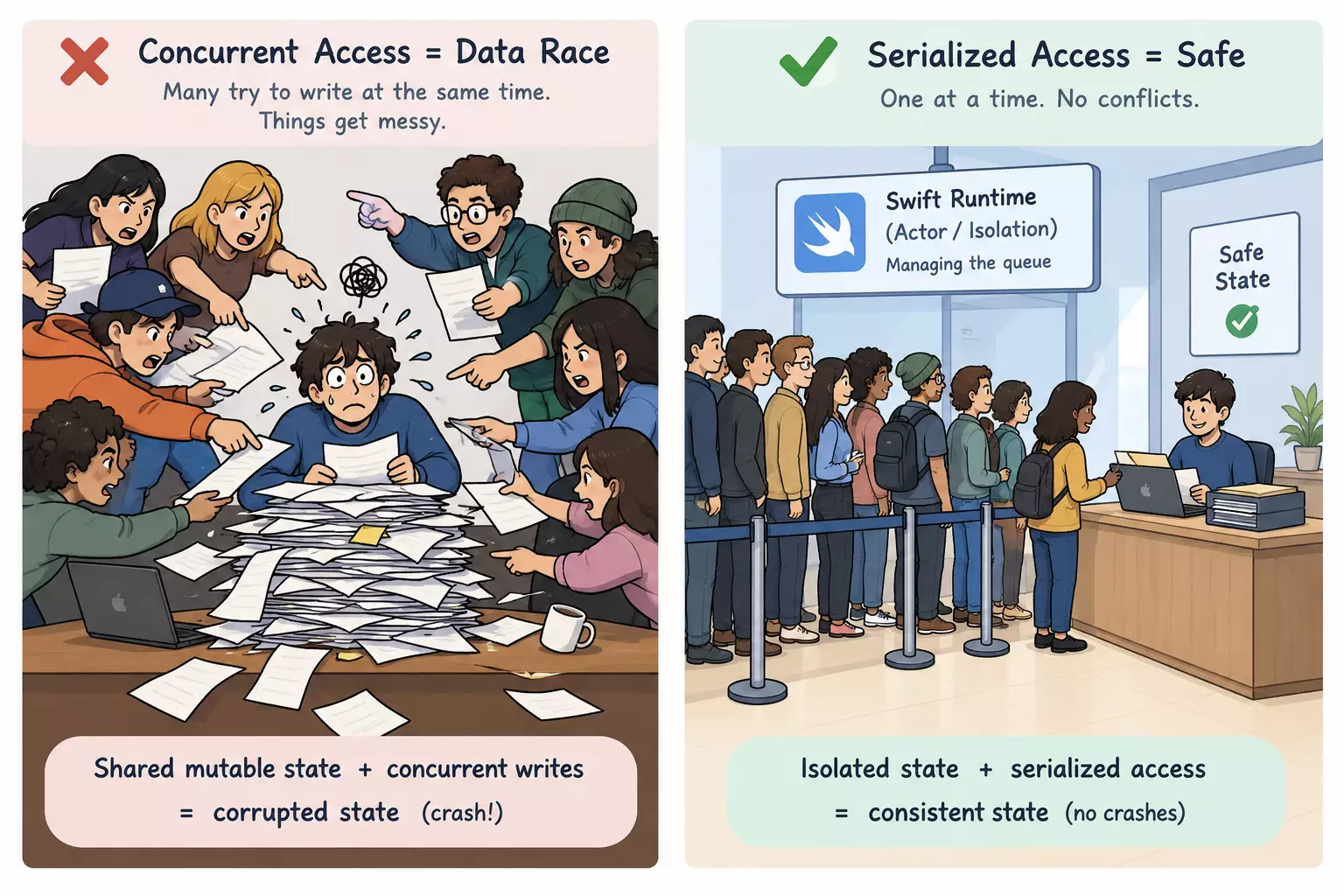
A data race happens when two pieces of code access the same mutable state at the same time, and at least one of them writes to it.
In the image cache, that’s exactly what happens. Two rows finish their downloads at the same moment, and both call store on the same cache. Both write to the same dictionary at once. If the dictionary is in the middle of growing its storage when the second write comes in, its internal memory ends up in a broken state, and the app crashes.
You can make this visible with an even smaller example. Here’s a counter, incremented 1,000 times from concurrent tasks:
final class Counter {
    var value = 0

    func increment() {
        value += 1
    }
}

let counter = Counter()

await withTaskGroup(of: Void.self) { group in
    for _ in 0..<1000 {
        group.addTask { counter.increment() }
    }
}

print(counter.value)You’d expect 1,000. But run it a few times, and you might get 973, then 988, then 1,000. The result changes every time. value += 1 looks like one step, but it’s really three: read the value, add one, write it back. When two tasks read the same value at the same moment, both write back the same result, and one increment is lost.
Why Data Races Are So Painful
Data races are some of the hardest bugs to deal with, for several reasons.
They’re random. Whether a race happens depends on timing: which task runs first, how busy the device is, how fast the network responds. That’s why the cache worked perfectly on your device and crashed for one user in a thousand.
They hide. The crash often happens far from the actual cause. The stack trace points into Dictionary, but the real problem is that two tasks shared the cache without protection.
They corrupt data silently. Not every race crashes. The counter didn’t crash. It just gave the wrong result. In a real app, that could be a wrong total in a shopping cart or a lost user setting, and you might never notice.
Preventing them was all on you. Before Swift concurrency, you protected shared state with locks or serial dispatch queues. That works, but only if you remember it everywhere, every time. Forget one lock, and the bug is back.
The tools only helped at runtime. Thread Sanitizer can detect data races, but only if the race actually happens while it’s running. If the timing doesn’t line up during your test, it finds nothing.
Swift Concurrency Moves This into the Compiler
This is the problem Swift concurrency was designed to solve. Instead of hoping you remember every lock, the compiler checks for data races before your app ever runs.
To do that, Swift concurrency is built into the type system. Isolation is part of a type, just like its properties and functions. Every piece of code runs in an isolation domain, as described in the concurrency chapter of The Swift Programming Language:
- The main actor, where your UI code runs.
- A specific actor, which protects its own state.
- Nonisolated, which doesn’t belong to any actor.
Inside one isolation domain, only one piece of code runs at a time, so accessing state there is safe. The danger is when values cross from one domain to another, like when the cache is captured by several tasks running at the same time.
And this is where the compiler steps in. In Swift 6, the loadImages function from the beginning doesn’t compile anymore. The compiler sees that the cache is shared between tasks that can run concurrently, and that it isn’t safe to share. It tells you that ImageCache isn’t Sendable.
The crash your users would have hit randomly in production is now a compiler error on your machine. This is what the Swift 6 migration guide calls data race safety.
What Sendable Means
Sendable is a promise that a value is safe to pass from one isolation domain to another. It was introduced in SE-0302, and you can find the full rules in Apple’s Sendable documentation.
When a type is Sendable, the compiler knows that sharing it across tasks or actors can’t cause a data race. When it isn’t, the compiler stops you from passing it across.
A few things are worth knowing:
- It’s checked at compile time. Sendable has no runtime cost. It only exists so the compiler can check your code.
- It’s only checked at boundaries. Within one isolation domain, non-Sendable types are completely fine. The compiler only cares when a value crosses from one domain to another.
- It’s about state. Whether a type can be Sendable depends on what state it holds and how that state is protected.
Which Types Are Sendable
Structs and Enums
Structs and enums are value types. When you pass one to another isolation domain, it’s copied, so both sides have their own copy and nothing is shared.
That’s why a struct can have var properties and still be Sendable. Each copy has its own mutable state, and changing one doesn’t affect the other.
struct Product: Sendable {
    let id: UUID
    var name: String    // fine, each copy has its own name
}A struct or enum is Sendable automatically if all its stored properties are Sendable. Standard types like Int, String, Data, Array, Dictionary, and Optional are Sendable as long as their contents are. One exception: public types don’t get this automatically, so you need to declare Sendable explicitly.
But a struct isn’t automatically safe just because it’s a struct. If it holds a class that isn’t Sendable, the copy still points to the same shared instance:
struct Order {
    var product: Product
    var cache: ImageCache   // a non-Sendable class, so Order isn't Sendable
}Classes Without var
A class is a reference type. Passing it around doesn’t copy it. Everyone shares the same instance.
But if nobody can change that instance, sharing it is safe. A class with only let properties of Sendable types can be Sendable. It has to be final, though, because a subclass could add mutable state. And you need to declare the conformance yourself:
final class Configuration: Sendable {
    let baseURL: URL
    let timeout: TimeInterval

    init(baseURL: URL, timeout: TimeInterval) {
        self.baseURL = baseURL
        self.timeout = timeout
    }
}Classes With var
This is the classic problem, and it’s exactly what our image cache and counter are. A class with mutable state, shared between isolation domains, means two pieces of code can read and write the same state at the same time.
A class like this can’t simply be Sendable. It needs protection, and there are a few ways to add it.
Isolate it to the main actor. A @MainActor class is Sendable, because all access to its state happens on the main actor, one at a time. This is what your view models look like:
@MainActor
final class CounterViewModel {
    var count = 0   // protected by the main actor
}Turn it into an actor. That’s coming up next.
Protect it with a lock. You can synchronize the state yourself, for example with Mutex from the Synchronization framework. With older locks like NSLock, you mark the class @unchecked Sendable, which tells the compiler to trust you. More on that later.
Actors
Actors are always Sendable (WWDC session Protect mutable state with Swift actors.). They can have mutable state because they protect it themselves: only one caller accesses an actor’s state at a time. Everyone else waits for their turn, which is why you call an actor’s methods with await from outside.
actor TokenStore {
    private var token: String?

    func store(_ newToken: String) {
        token = newToken
    }
}One thing to keep in mind: an actor protects its own state, not the values you pass into it. The parameters and return values of its methods still need to be Sendable.
Closures
Closures matter too, because tasks are closures. A closure that runs in another isolation domain needs to be @Sendable, which means it can only capture Sendable values and can’t capture mutable local variables.
That’s exactly what went wrong in loadImages: the closure passed to addTask captured the non-Sendable cache. Many confusing errors with Task and callbacks come down to this rule.
Summary
| Type | Sendable? | Why |
|---|---|---|
| Struct or enum with Sendable properties | Yes, automatically | Copied when passed, nothing is shared |
| Struct with a non-Sendable class property | No | The copy still shares the class instance |
Final class with only let properties | Yes, if declared | Shared, but nobody can change it |
Class with var properties | No | Shared mutable state, so a data race risk |
@MainActor class | Yes | State is protected by the main actor |
| Actor | Yes, always | State is protected by the actor |
Class with a lock, @unchecked Sendable | Yes, on your word | You guarantee safety, the compiler doesn’t check |
Fixing the Image Cache
Back to the cache. Which option fits?
The cache is shared mutable state. It needs to be shared, because every row should benefit from images that other rows already downloaded. And the UI doesn’t read the cache directly. So the right fit is an actor:
actor ImageCache {
    private var images: [URL: Data] = [:]

    func image(for url: URL) -> Data? {
        images[url]
    }

    func store(_ data: Data, for url: URL) {
        images[url] = data
    }
}The only change in loadImages is an await:
group.addTask {
    guard let (data, _) = try? await URLSession.shared.data(from: url) else { return }
    await cache.store(data, for: url)
}Now only one task at a time can access the dictionary. When two downloads finish at the same moment, one waits for the other.
Why not the other options? A struct would give every task its own copy, so it wouldn’t be a shared cache anymore. Putting the cache on the main actor would also be safe, but then every background task would have to hop over to the main actor just to store some data, competing with your UI for no reason.
The crash is gone. And it’s gone not because you remembered a lock, but because the compiler won’t let you share the cache unsafely again.
The Real Problem: Shared Mutable State Without Protection
If you take one thing from this post, let it be this: mutable state alone isn’t the problem. A struct can have var properties and be perfectly safe.
The problem is state that is shared and mutable without protection. Take away any one of those three, and the data race is gone:
- Value types avoid sharing, because every copy is separate.
- Immutable classes avoid mutation, because nobody can change them.
- Actors and the main actor add protection, because only one caller accesses the state at a time.
Sendable is how the compiler checks that one of these is true for every value crossing a boundary.
What This Means for Structuring Your App
Once you see Sendable this way, it changes how you structure your code. The question for every type becomes: what kind of state does it hold?
- UI state lives on the main actor. That’s your view models and coordinators.
- Non-UI state lives in its own actor. That’s your image cache or a token store.
- No state means nothing to protect. That’s stateless services and value-type models.
When your components are organized this way, most Sendable errors never show up in the first place. I go deeper into this in How I Structure SwiftUI Apps So the Compiler Stays Quiet.
What Sendable Errors Are Telling You
Sendable errors can be really annoying. But most of them say the same thing: mutable state is about to cross a boundary without protection.
The most common causes I see are:
- Class-based models. A model class with
varproperties passed from a service to a view model. - Services with hidden state. A service class that keeps a cache or a counter inside.
- Closures capturing mutable variables. A
varcaptured by aTaskor a callback.
So before adding annotations to make an error go away, ask where this state should live. Often the fix is to turn a class into a struct, move state into an actor, or make a service stateless.
The Escape Hatches
Swift gives you ways to turn off the checks: @unchecked Sendable for types and nonisolated(unsafe) for variables.
They have legitimate uses. If you protect a class’s state with a lock yourself, @unchecked Sendable tells the compiler you’ve got it covered. With Mutex from the Synchronization framework, you often don’t even need that, because Mutex itself is Sendable, so a final class that stores its state in a let mutex can be checked by the compiler.
But if you use these just to silence errors, you’re bringing back exactly the kind of crash from the beginning of this post. The compiler stops checking, and you’re back to random crashes you can’t reproduce.
Why Some Non-Sendable Code Still Compiles
At some point, you’ll notice that a non-Sendable value crosses a boundary and the compiler doesn’t complain. That’s not a bug.
Since Swift 6, the compiler can see when you pass a non-Sendable value to another isolation domain and never use it again in the original one. If you hand it off completely, nothing is shared, so there’s no risk of a data race. The rules haven’t changed: the compiler is just smart enough to see that the state isn’t actually shared.
Wrap-Up
Data races used to be some of the hardest bugs to find. They were random, they hid behind misleading crash reports, and preventing them depended on never forgetting a single lock.
Sendable changes that. It turns those runtime crashes into compiler errors, on your machine, before your users ever see them. The errors can be annoying, but every one of them points to state that could have crashed your app.
Think about where your state lives, whether it’s shared, and how it’s protected. Once you do, Sendable stops feeling like a fight with the compiler.
Further Reading