

Structuring a SwiftUI app has always been about the same goals for me: well-organized code, components that each do one job, and an app that stays maintainable as it grows. I want to find things quickly, change a feature without breaking something else, and use previews without depending on a server.
Swift concurrency added a new problem on top of that, and it’s painful. As soon as you add networking, caching, or authentication, the compiler starts complaining. Sendable errors, main actor isolation errors, data race warnings. You add @MainActor somewhere, and a new error shows up somewhere else. At some point you start wondering: does Swift concurrency even work with SwiftUI? And if it does, how are you supposed to structure your app so it fits?
It does work. In this post, I’ll show you how I structure my SwiftUI apps so that they stay organized and maintainable, and so that SwiftUI and Swift concurrency work together instead of against each other.
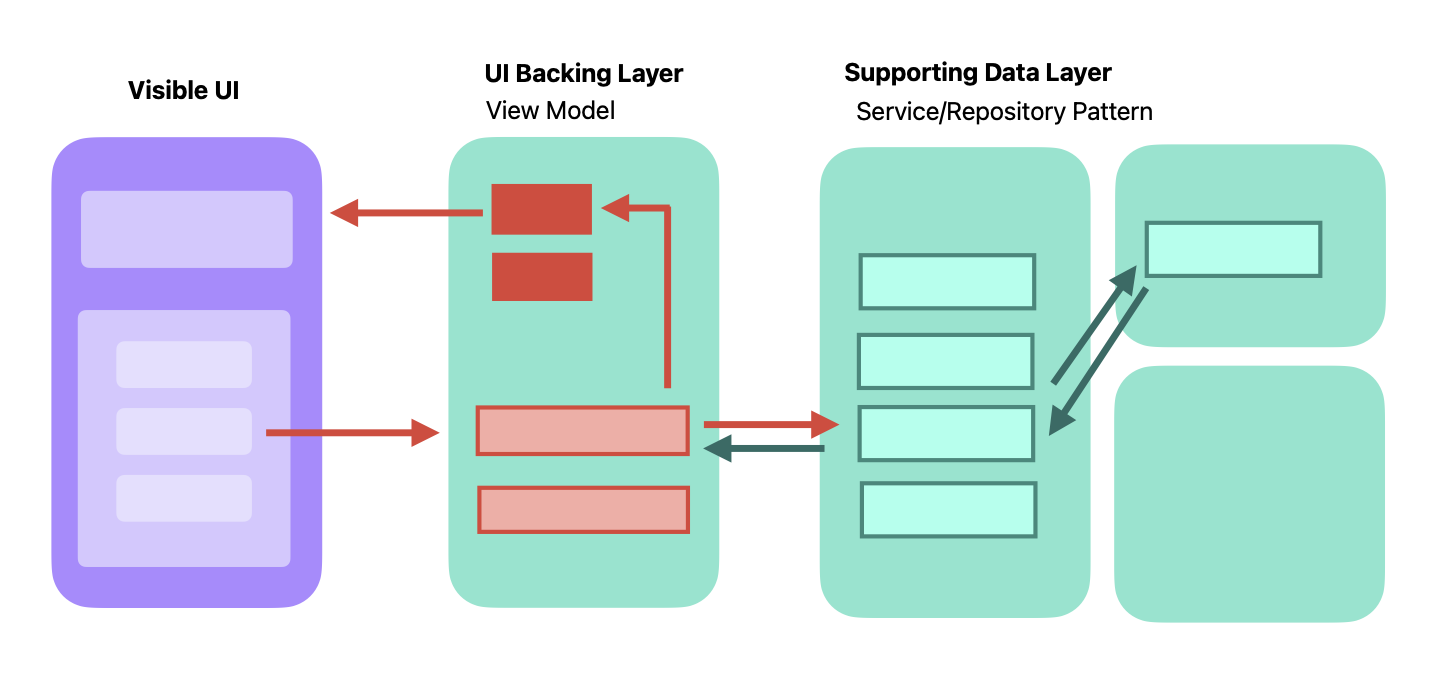
Concurrency Is Part of Your Architecture
Swift concurrency is built into the type system. Isolation is part of a type, just like its properties and functions. That means every time you decide what goes into a type, you’re also making a concurrency decision, whether you realize it or not.
What decides the isolation a type needs is the state it holds. So when I separate my code into components, I look at their state. There are three kinds I care about: UI state, non-UI state, and no state at all. Each one leads to a different kind of component.
My View Model is for UI State, and Methods to change UI State
UI state is anything your views read to render themselves: the list of products, a loading flag, an error message. Apple gave us @Observable for exactly this. It tracks which properties a view reads and updates the view when they change.
Because SwiftUI renders on the main actor, that state belongs on the main actor too:
@MainActor
@Observable
final class ProductListViewModel {
    var products: [Product] = []
    var isLoading = false
    var errorMessage: String?

    private let service: ProductService

    init(service: ProductService) {
        self.service = service
    }

    func loadProducts() async {
        isLoading = true
        defer { isLoading = false }

        do {
            products = try await service.fetchProducts()
        } catch {
            errorMessage = "Could not load products."
        }
    }
}Thinking about the view model this way made me rethink what I put into it. My view models used to collect everything: caches, tokens, helper state, anything that didn’t fit elsewhere. Now I follow a simple rule: the view model owns and mutates UI state. Functions that are called fromt the UI e.g. button press, call the view model methods that are @MainActor.
That keeps my view models small, and focused on a clear Separation of Concern.
My Services Are Stateless
A service fetches data, decodes it, maybe transforms it, and returns it. It doesn’t need to remember anything. And when a type has no state, there’s nothing to protect from data races.
That makes services the easiest layer to get right. A service is just a struct:
nonisolated struct RemoteProductService: ProductService {
    @concurrent
    func fetchProducts() async throws -> [Product] {
        let url = URL(string: "https://api.example.com/products")!
        let (data, _) = try await URLSession.shared.data(from: url)
        return try JSONDecoder().decode([Product].self, from: data)
    }
}It’s nonisolated because it doesn’t belong to any actor. This allows me to move it across actors. For the heavy work, like decoding a large response, I mark the function with @concurrent so it runs in the background instead of blocking the main actor.
The view model calls it with await, the work happens off the main actor, and the result comes back to the view model, which assigns it to its UI state. One clear crossing point, and the compiler checks it for me.
Heavy Work Inside a View Model
Sometimes part of a view model function does heavy work. Filtering and sorting a large list, for example, or processing an image. The view model is on the main actor, so that work would block the UI.
In that case, I pull the heavy part out into its own function and mark it @concurrent:
@MainActor
@Observable
final class ProductListViewModel {
    var allProducts: [Product] = []
    var filteredProducts: [Product] = []

    func search(for query: String) async {
        filteredProducts = await filter(allProducts, matching: query)
    }

    @concurrent
    private func filter(_ products: [Product], matching query: String) async -> [Product] {
        products
            .filter { $0.name.localizedCaseInsensitiveContains(query) }
            .sorted { $0.name < $1.name }
    }
}The @concurrent function runs in the background, so it can’t touch the view model’s state directly. Everything it needs comes in as parameters, and the result goes back as a return value. The main actor function passes the data in, awaits the result, and assigns it to the UI state.
It’s the same pattern as with services: the state stays on the main actor, and only Sendable values cross over to the background and back.
If you notice that you’re writing a lot of these functions in one view model, that’s usually a sign the work belongs in a service instead.
Protocols and Sendable
Sendable errors are really annoying. They show up in places you don’t expect, and the messages don’t always tell you what’s actually wrong.
Most of my Sendable errors came from services that were classes with some state hidden inside: a cached response, a counter, a mutable configuration. The moment such a service was stored in a main actor view model and called across isolation boundaries, the compiler complained. And it was right, because that state really could be accessed from two places at once.
With a stateless struct, the problem disappears. A struct without mutable state is Sendable naturally, so I put the requirement right into the protocol:
nonisolated protocol ProductService: Sendable {
    func fetchProducts() async throws -> [Product]
}Every service I inject is now guaranteed to be safe to pass around. And the protocol gives me something I use all the time: I can swap the real service for a mock in previews and tests.
nonisolated struct MockProductService: ProductService {
    func fetchProducts() async throws -> [Product] {
        [Product(id: UUID(), name: "Preview Product", price: 9.99)]
    }
}

#Preview {
    ProductListView(viewModel: ProductListViewModel(service: MockProductService()))
}No server, no network, no Sendable errors. Just data in my preview.
Models: What Crosses From the Background to the Main Actor
Data travels from the service, which runs in the background, to the view model on the main actor. Whatever crosses that boundary has to be Sendable.
The Simple Way: A Struct
In most cases, I just use a struct for my model:
nonisolated struct Product: Identifiable, Codable, Sendable {
    let id: String
    let name: String
    let price: Decimal
}The service decodes it in the background and returns it, and the view model assigns it to its UI state. A struct with immutable properties is Sendable, so it crosses the boundary without complaints.
For many apps, this is all you need.
When the UI Modifies the Data: DTOs
Sometimes a struct isn’t enough. The user can rename a product or mark it as a favorite, and the views should update right away. For that, you want an @Observable class:
@MainActor
@Observable
final class Product: Identifiable {
    let id: String
    var name: String
    var isFavorite: Bool

    init(dto: ProductDTO) {
        id = dto.id
        name = dto.name
        isFavorite = dto.isFavorite
    }
}This class is UI state, so it’s isolated to the main actor. That means the service can’t create it in the background. Instead, the service returns a DTO, a data transfer object, which is a simple Sendable struct:
nonisolated struct ProductDTO: Codable, Sendable {
    let id: String
    let name: String
    let isFavorite: Bool
}
nonisolated struct RemoteProductService: ProductService {
@concurrent
func fetchProducts() async throws -> [ProductDTO] {
let url = URL(string: "https://api.example.com/products")!
let (data, _) = try await URLSession.shared.data(from: url)
return try JSONDecoder().decode([ProductDTO].self, from: data)
}
}The DTO crosses the boundary, and the view model turns it into the observable model on the main actor:
func loadProducts() async {
    do {
        let dtos = try await service.fetchProducts()
        products = dtos.map(Product.init)
    } catch {
        errorMessage = "Could not load products."
    }
}So the work is split by isolation. Fetching and decoding happen in the background and produce Sendable DTOs. Creating the observable models happens on the main actor, where they’re used as UI state. When you save changes, it goes the other way: the view model creates a DTO from the model and hands it to the service.
State the UI Never Sees Gets Its Own Actor
Some state isn’t UI state, but it’s still state. My favorite example is a token store. It holds the authentication token, refreshes it when it expires, and hands it to the network layer. No view ever displays the token.
So it doesn’t belong in the view model, and it doesn’t belong on the main actor. But it’s shared mutable state: several requests might ask for the token at the same time, and two of them might try to refresh it at once. That’s what actors are for:
actor TokenStore {
    private var token: String?
    private var refreshTask: Task<String, Error>?

    func validToken() async throws -> String {
        if let token { return token }

        if let refreshTask {
            return try await refreshTask.value
        }

        let task = Task { try await refreshToken() }
        refreshTask = task
        defer { refreshTask = nil }

        let newToken = try await task.value
        token = newToken
        return newToken
    }

    private func refreshToken() async throws -> String {
        // Call your auth endpoint here
        "new-token"
    }
}The actor protects its state. If several requests ask for a token while a refresh is running, they all wait for the same refresh instead of starting their own. That kind of bug is really hard to find at runtime, and here the structure prevents it.
My Cheat Sheet
This is how it all comes together:
| State | Layer | Isolation |
|---|---|---|
| UI state | View, view model, coordinator | @MainActor |
| Non-UI state | Token store, cache | Its own actor |
| No state | Service | Nonisolated struct, @concurrent functions for heavy work |
| Data passed between layers | Model | Sendable value types |
When I create a new type, I check what state it holds. That tells me which layer it belongs to and how it’s isolated, so I don’t have to fix concurrency errors afterward.
A Note on Project Settings
The code in this post assumes a new Xcode 26 project, where default main actor isolation is turned on. In that setup, every type is on the main actor unless you opt out, which is why the services, protocols, and models are marked nonisolated. The view model is main actor either way, but I keep the explicit @MainActor so the intent is clear.
If your project doesn’t use default main actor isolation, it’s the other way around. You don’t need the nonisolated markers, but you do need to add @MainActor to your view models yourself. @Observable doesn’t do that for you.
My Advice
If you’re fighting Swift concurrency right now, here’s what I’d recommend:
- Before you create a type, look at its state. UI state, non-UI state, or no state. That tells you where it belongs.
- Keep your view models for UI state. If the UI doesn’t read it, move it out.
- Make services stateless whenever you can. A stateless struct is the easiest thing to make Sendable.
- Use protocols that require
Sendable. You get safe injection and easy mocks for previews and tests. - Make your models value types. They cross every boundary without complaints.
- Give shared non-UI state its own actor. Don’t hide it in a view model or a singleton.
- When you hit a Sendable error, check where your state lives before adding annotations. Most of the time, the error is pointing at your structure.
The compiler is showing you exactly where your state is in the wrong place. Once your app is structured around state, it mostly stays quiet.
Further Reading
If you want to go deeper into how to separate your SwiftUI code, from views and view models to services and modules, check out my course.
Apple’s WWDC25 sessions
- Explore concurrency in SwiftUI. A good starting point if you’re wondering how SwiftUI and Swift concurrency fit together. It shows how SwiftUI runs on the main actor by default and hands work off to other actors.
- Embracing Swift concurrency. The best overview of the core concepts. It walks through taking an app from single-threaded to concurrent, with chapters on value types, actor-isolated types, and actors that match the layers in this post.
- Code-along: Elevate an app with Swift concurrency. A hands-on session that starts with a main-actor app, moves work to the background, and works through fixing data-race safety errors. It also covers the approachable concurrency settings.
Swift documentation
- The Swift Programming Language: Concurrency. The official language guide chapter on async/await, actors, and Sendable.
- Swift 6 Migration Guide. Useful if you’re moving an existing project to Swift 6 and hitting data-race errors.
Swift Evolution proposals
For the details behind the code in this post:
- SE-0461: Run nonisolated async functions on the caller’s actor by default. Introduces
@concurrentand explains why it’s needed for background work. - SE-0466: Control default actor isolation inference. The proposal behind default main actor isolation in new Xcode projects.
- SE-0449: Allow nonisolated to prevent global actor inference. Explains why you can mark types and protocols as
nonisolated.