

When you write @State private var count = 0 in a SwiftUI view, it looks like a normal property declaration. It’s not. That line doesn’t store a value inside your view struct. It tells SwiftUI to create a node in something called the AttributeGraph. A runtime data structure that holds your actual state and tracks every dependency in your view hierarchy.
The AttributeGraph
SwiftUI maintains an internal data structure called the AttributeGraph. It’s a directed graph where every node represents a value. A view’s body, a modifier, a piece of state, and the edges are the dependencies between them.
When a state value changes, SwiftUI walks the edges to find exactly which nodes are affected and only reevaluates those. This is how SwiftUI decides whether your view’s body needs to run again. It’s not diffing a DOM. It’s tracking state dependencies.
If you’ve ever opened Instruments and looked at the SwiftUI cause-and-effect graph, you’ve seen a slice of this. That’s the AttributeGraph. The nodes, the edges, the dependency chains. That’s what’s running your app.
What does the @State Property Wrapper do?
When SwiftUI sees @State, it creates a node in the AttributeGraph to store this value. Here’s what that looks like in practice:
struct ParentView: View {
    // This creates a node in the AttributeGraph that holds the Int.
    // ParentView.body has a dependency edge to this node.
    @State private var counter = 0

    var body: some View {
        VStack {
            // `counter` flows into ChildView as an input — another edge in the graph.
            // When counter changes, SwiftUI walks the edges and knows
            // both ParentView.body and ChildView.body need reevaluation.
            ChildView(label: "You selected (counter)")
            Button("Increment: (counter)") { counter += 1 }
        }
    }
}

struct ChildView: View {
    let label: String  // an input edge from the parent's node
    var body: some View {
        Text(label)
    }
}@State doesn’t store the value in ParentView. ParentView is a struct. A short-lived value type. It gets created, body gets evaluated, and it goes away. The actual counter value persists in the AttributeGraph across those struct lifetimes. The struct dies, the node in the graph doesn’t.
If you’ve opened Instruments and looked at the cause and effect graph, you’ve seen a slice of this. That’s the AttributeGraph. The nodes, the edges, the dependency chains. That’s what’s running your app.
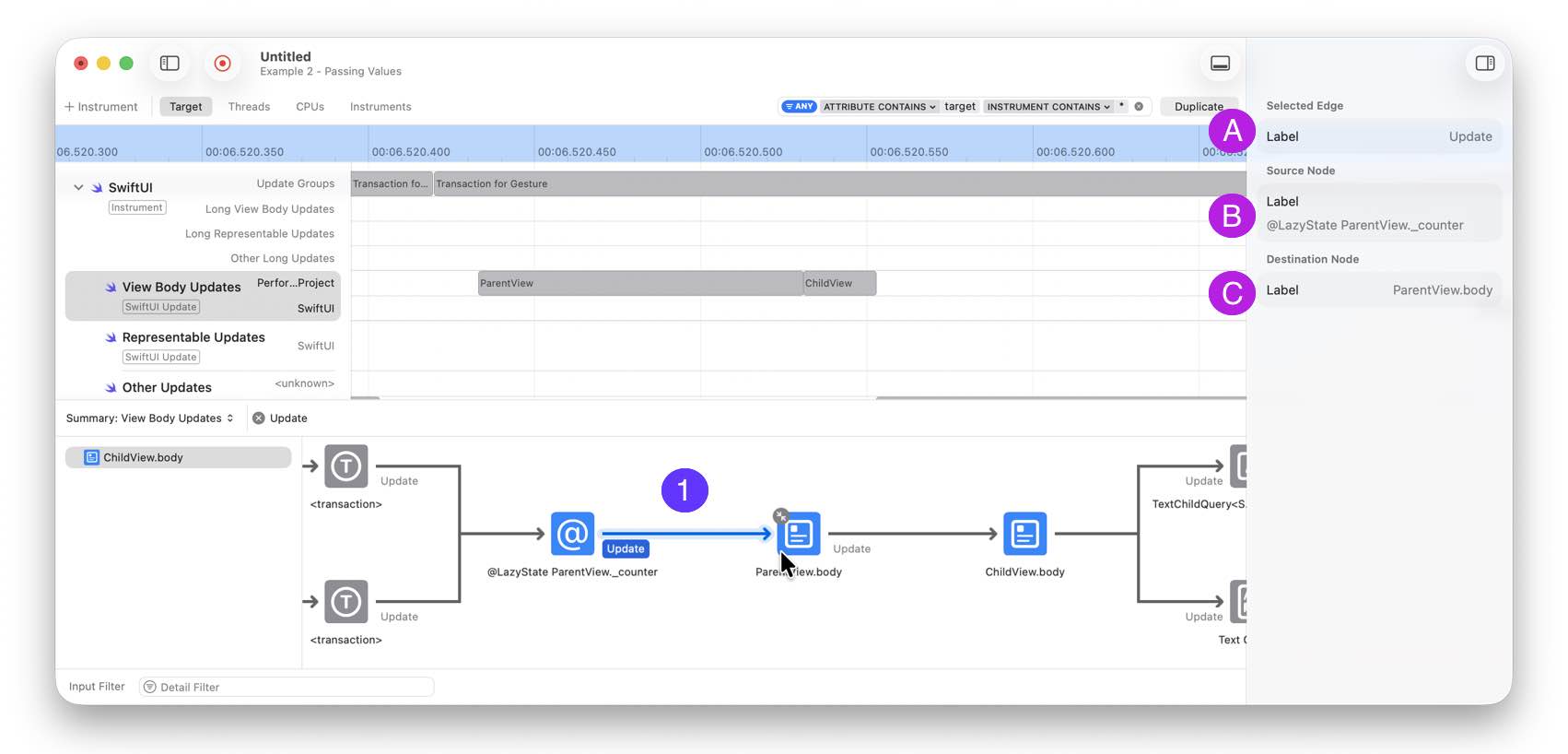
In the right sidebar, inside Instruments, you can see more details from the AttributeGraph and follow the updating process.
(A) This is updating an existing view
(B) The source node is a state node from ParentView._counter to
(C) Destination ParentView.body
What happens when you ignore this
This matters the moment you try to initialize @State from a parent value. You have a NavigationSplitView. The sidebar shows a list of users. When someone selects one, the detail pane loads that user’s profile. The detail view needs a userID from the parent to get started.
The natural instinct is to initialize the view model in init and pass the value there:
struct DetailView: View {
    @State private var viewModel: ViewModel

    init(userID: UUID) {
        _viewModel = State(wrappedValue: ViewModel(id: userID))
    }
}It works the first time. You select a user, the detail pane loads. Then you select a different user. The detail pane doesn’t update. It’s still showing the first user.

Why it breaks
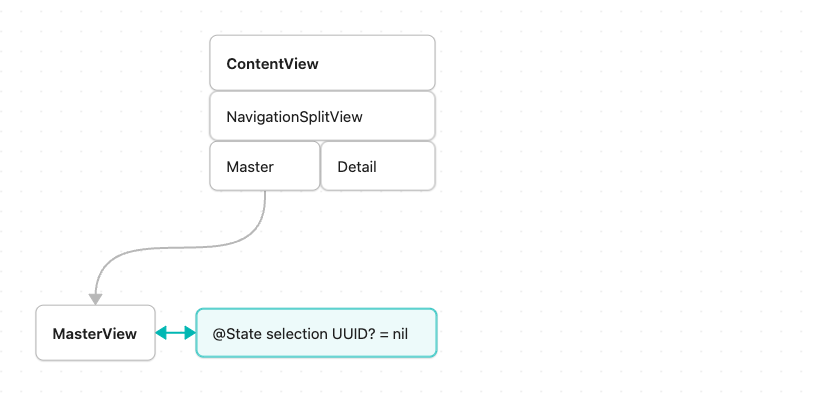
Let`s see, how the AttributeGraph looks behind these flow. First the selection is nil and no detail is shown:
Next selecting an item from the sidebar. The AttributeGraph adds a node for the new DetailView and stores the asscoated state with it:
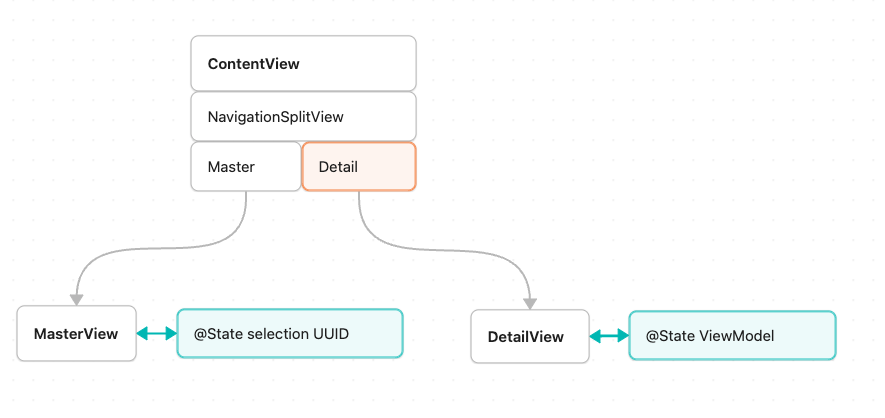
@State creates a node in the AttributeGraph. SwiftUI reads the underscore syntax once. When that view identity is born. After that, the storage lives in the graph.
When the parent passes a new userID, init runs again. _viewModel = State(wrappedValue: ViewModel(id: newUserID)) executes. And SwiftUI throws the new value away. It already has a node for this identity. It doesn’t need a new one.
You now have two sources of truth. The parent knows the selection changed. The child’s view model is still working with the old userID. They’re out of sync.
The fix
Stop trying to re-initialize. React to the change instead. Pass userID as a plain property and let the view model own the response:
struct DetailView: View {
    let userID: UUID
    @State private var viewModel: ViewModel?

    var body: some View {
        UserDetailContent(viewModel: viewModel)
            .task(id: userID) {
                if viewModel == nil {
                    viewModel = ViewModel()
                }
                await viewModel?.load(for: userID)
            }
    }
}userID is a plain property. An input edge in the graph. @State holds the view model as a node. .task(id:) fires whenever userID changes, including the first time the view appears. The view model is created once, and load(for:) handles every subsequent change.
The parent owns the selected ID. The view model owns the loaded data. One source of truth on each side.

Going deeper
This example is from chapter 3 of my book, SwiftUI Data Flow. The whole book is built around understanding how the AttributeGraph, view identity, and state ownership actually work. Ao you can reason about your SwiftUI code instead of guessing.
30% off until the end of September.
Read about the AttributeGraph in this post.