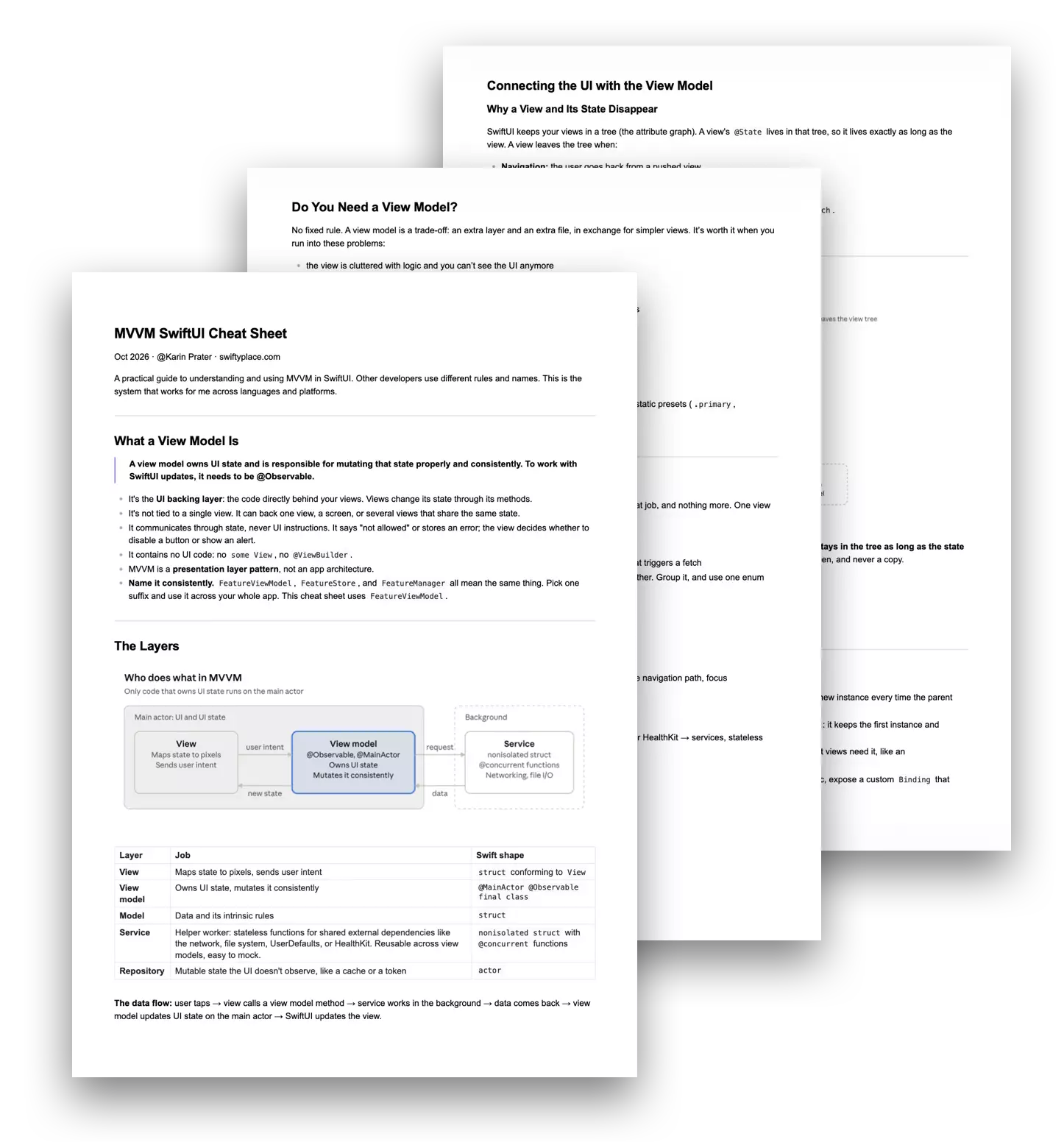
In What Should Go in a View Model?, we defined the view model’s job: it owns UI state and is responsible for mutating that state properly and consistently. But to do that job, it almost always needs something from outside your own code. Products come from the network. Themes are saved to disk. Settings live in UserDefaults.
The easiest way to get there is to write that code right into the view model. A URLSession call here, a JSONDecoder there. It works, until you open a preview and it spins forever, or crashes because there’s no server. Or until you try to write a test, and it’s slow, fails randomly, or can’t be written at all.
In this post, I’ll show you how to fix both problems with dependency injection in Swift: move that work into services, let your view models depend on a protocol instead of the real thing, and inject what you need. By the end, every view model can run in a preview and a unit test without touching UserDefaults or the network.
Why keeping UserDefaults Code Inside the View Model becomes a Problem
Let’s start with a simple example. Users can mark products as favorites, and the favorites are saved in UserDefaults. Here’s the version most of us write first, with UserDefaults right inside the view model:
@MainActor
@Observable
final class FavoritesViewModel {
    private(set) var favoriteIDs: Set<Product.ID> = []
    private let key = "favoriteProductIDs"

    init() {
        // ⚠️ Reading UserDefaults inside the view model
        favoriteIDs = Set(UserDefaults.standard.stringArray(forKey: key) ?? [])
    }

    func toggleFavorite(_ product: Product) {
        if favoriteIDs.contains(product.id) {
            favoriteIDs.remove(product.id)
        } else {
            favoriteIDs.insert(product.id)
        }
        // ⚠️ Writing UserDefaults inside the view model
        UserDefaults.standard.set(Array(favoriteIDs), forKey: key)
    }
}This works in the app. The problems show up everywhere else.
Previews keep what you tapped. Tap a heart in the preview, and it’s written to the real UserDefaults. Open the preview again tomorrow, and the favorite is still there. You can’t reliably show the empty state, and to show a screen with three favorites, you have to tap them again every time, or write test data into UserDefaults by hand.
Tests depend on each other. Say one test checks that toggling adds a favorite, and another checks that a new view model starts with no favorites:
@Test func toggleAddsFavorite() {
    let viewModel = FavoritesViewModel()
    viewModel.toggleFavorite(Product.samples[0])
    #expect(viewModel.favoriteIDs.count == 1)
}

@Test func startsWithNoFavorites() {
    let viewModel = FavoritesViewModel()
    #expect(viewModel.favoriteIDs.isEmpty) // ❌ fails if the other test ran first
}Both tests read and write the same key in the same UserDefaults. Whether the second one passes depends on which test runs first, and on what earlier runs left behind. Run them in parallel, and they fail at random. That’s the worst kind of test: one you stop trusting.
The view model has two jobs. It manages the favorites as UI state, and it knows how they’re stored: the key, the format, the storage API. Switch to iCloud or a file later, and you rewrite the view model. Need favorites in a second view model, and you copy the storage code.
UserDefaults is just one example. The problem has a name: a shared external dependency, a resource outside your own code that’s shared with the system, the rest of your app, and other tests. Think of:
- the network
- the file system
UserDefaultsand the Keychain- HealthKit, location, contacts
- even the current date and time
With the network, it gets worse: requests are slow, and they fail for reasons that have nothing to do with your code. That leads to a simple rule: shared external dependencies go behind a boundary you control. Everything else, like your models and the view model’s own logic, can run for real.
Step 1: Move the Storage Code Into a Service
So the storage code moves into a service. A service is a helper worker: a stateless type that handles one kind of work with a shared external dependency.
nonisolated struct FavoritesService {
    private let key = "favoriteProductIDs"

    func loadFavoriteIDs() -> Set<Product.ID> {
        Set(UserDefaults.standard.stringArray(forKey: key) ?? [])
    }

    func saveFavoriteIDs(_ ids: Set<Product.ID>) {
        UserDefaults.standard.set(Array(ids), forKey: key)
    }
}- Stateless: it has no properties that change. It takes input, does the work, and returns a result. The favorites themselves stay in the view model.
- Reusable: any view model that needs favorites can use it, like a product list and a product detail screen.
- Ready for the background: it’s
nonisolated, so it isn’t tied to the main actor. ReadingUserDefaultsis fast, but for slow work like network requests, the service can run its functions in the background, as you’ll see in the second example.
The view model keeps its job, managing the state, and hands the storage work to the service:
@Observable
final class FavoritesViewModel {
    private(set) var favoriteIDs: Set<Product.ID> = []
    private let favoritesService = FavoritesService()

    init() {
        favoriteIDs = favoritesService.loadFavoriteIDs()
    }

    func toggleFavorite(_ product: Product) {
        if favoriteIDs.contains(product.id) {
            favoriteIDs.remove(product.id)
        } else {
            favoriteIDs.insert(product.id)
        }
        favoritesService.saveFavoriteIDs(favoriteIDs)
    }
}One naming rule I stick to: a service never holds UI state. If something called a “service” has @Observable properties that views read, it’s a view model with the wrong name.
Step 2: Dependency Injection With a Protocol (the Dependency Inversion Principle)
Moving the storage code into a service cleaned up the view model. But it didn’t solve the preview and test problem yet. The view model creates the service itself, so it’s still locked to the real UserDefaults:
@Observable
final class FavoritesViewModel {
    private(set) var favoriteIDs: Set<Product.ID> = []
    private let favoritesService = FavoritesService() // ⚠️ always the real UserDefaults

    // ...
}No preview or test can change that. The fix is to flip the dependency around. Instead of depending on the concrete service, the view model depends on a description of what it needs: a protocol. That’s the Dependency Inversion Principle (DIP): high-level code, like your view model, shouldn’t depend on low-level details, like the code that reads and writes UserDefaults. Both depend on an abstraction in between: the protocol.
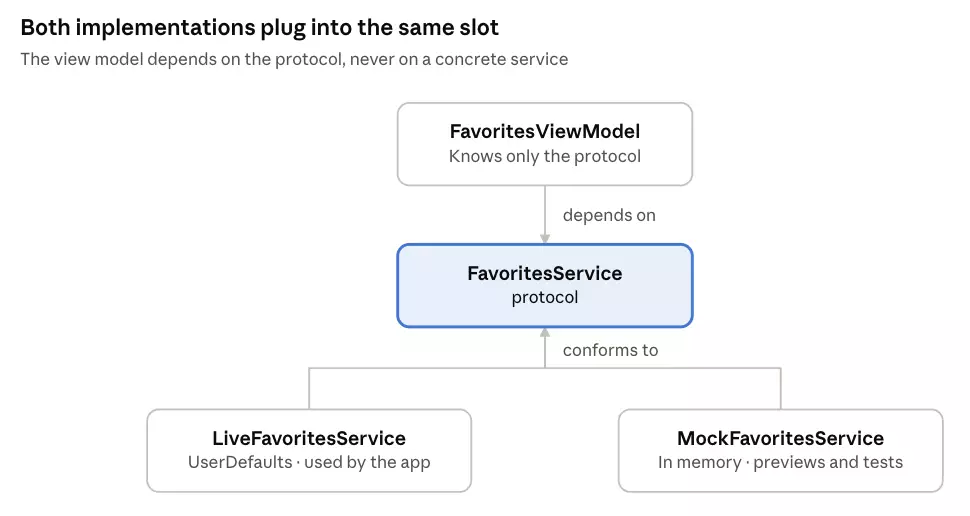
The protocol describes what the view model needs:
nonisolated protocol FavoritesService: Sendable {
    func loadFavoriteIDs() -> Set<Product.ID>
    func saveFavoriteIDs(_ ids: Set<Product.ID>)
}The service we wrote above becomes the live implementation:
nonisolated struct LiveFavoritesService: FavoritesService {
    private let key = "favoriteProductIDs"

    func loadFavoriteIDs() -> Set<Product.ID> {
        Set(UserDefaults.standard.stringArray(forKey: key) ?? [])
    }

    func saveFavoriteIDs(_ ids: Set<Product.ID>) {
        UserDefaults.standard.set(Array(ids), forKey: key)
    }
}The protocol is nonisolated and Sendable, so the view model on the main actor can hold it, and implementations aren’t tied to the main actor.
Now the view model receives whichever implementation you want through its initializer, with the live service as the default:
@MainActor
@Observable
final class FavoritesViewModel {
    private(set) var favoriteIDs: Set<Product.ID> = []
    private let favoritesService: FavoritesService

    init(favoritesService: FavoritesService = LiveFavoritesService()) {
        self.favoritesService = favoritesService
        favoriteIDs = favoritesService.loadFavoriteIDs()
    }

    func toggleFavorite(_ product: Product) {
        if favoriteIDs.contains(product.id) {
            favoriteIDs.remove(product.id)
        } else {
            favoriteIDs.insert(product.id)
        }
        favoritesService.saveFavoriteIDs(favoriteIDs)
    }
}In the app, nothing changes: FavoritesViewModel() uses the live service. Previews and tests pass in a mock. That’s all dependency injection is: the view model gets its dependencies from outside instead of creating them itself.
Initializer injection is the simplest way, and it’s what this post uses. It’s not the only one. In a real SwiftUI app, the bigger question is how dependencies get from the app’s entry point to every view model that needs them, especially when several view models share one instance. Common approaches are the SwiftUI environment and a dependency container. That’s a topic of its own, which I cover in SwiftUI Dependency Injection: Initializer, Environment, or Container?.
What You Gain: Previews for Every State
Here’s where the protocol pays off first. A mock conforms to the same protocol, but instead of touching UserDefaults, it starts with whatever favorites you give it and keeps everything in memory:
nonisolated struct MockFavoritesService: FavoritesService {
    var favoriteIDs: Set<Product.ID> = []

    func loadFavoriteIDs() -> Set<Product.ID> { favoriteIDs }
    func saveFavoriteIDs(_ ids: Set<Product.ID>) {}
}Now each preview injects a differently configured mock. @Previewable @State makes the preview the owner of the view model, just like the parent view in your app, so it’s created once instead of on every preview update:
#Preview("No Favorites") {
    @Previewable @State var viewModel = FavoritesViewModel(
        favoritesService: MockFavoritesService()
    )
    FavoritesView(viewModel: viewModel)
}

#Preview("With Favorites") {
    @Previewable @State var viewModel = FavoritesViewModel(
        favoritesService: MockFavoritesService(
            favoriteIDs: Set(Product.samples.prefix(3).map(.id))
        )
    )
    FavoritesView(viewModel: viewModel)
}Every state of the screen is one click away in Xcode, and tapping favorites in the preview never changes what’s saved on your Mac or simulator. Keep sample data like Product.samples next to the model, so previews and tests share it.
What You Gain: Reliable Unit Tests for View Models
The same mock makes unit tests straightforward. Inject it, call a method, and check the state:
import Testing

@MainActor
struct FavoritesViewModelTests {
    @Test func toggleAddsFavorite() {
        let product = Product.samples[0]
        let viewModel = FavoritesViewModel(favoritesService: MockFavoritesService())

        viewModel.toggleFavorite(product)

        #expect(viewModel.favoriteIDs == [product.id])
    }

    @Test func toggleRemovesExistingFavorite() {
        let product = Product.samples[0]
        let viewModel = FavoritesViewModel(
            favoritesService: MockFavoritesService(favoriteIDs: [product.id])
        )

        viewModel.toggleFavorite(product)

        #expect(viewModel.favoriteIDs.isEmpty)
    }
}This solves the leaky test problem from the beginning. With the live service, the first test would write a favorite to the real UserDefaults, and the second test, or the next run, would find it there. With the mock, every test starts with exactly the favorites it sets up, and nothing is left behind. That also means the tests are fast and can run in parallel.
Test what the view model is responsible for: how its state changes when you call its methods. What you don’t test here is UserDefaults itself, and you don’t test the UI; the view model only exposes state.
A Second Example: Loading Products From the Network
The same pattern works for every shared external dependency. The network adds two things the favorites example didn’t need: the work is slow, so it should run in the background, and the screen now has loading and error states.
The protocol describes what the view model needs, and the live service does the request and decoding in the background with @concurrent:
nonisolated protocol ProductService: Sendable {
    func fetchProducts() async throws -> [Product]
}

nonisolated struct LiveProductService: ProductService {
    @concurrent
    func fetchProducts() async throws -> [Product] {
        let url = URL(string: "https://api.example.com/products")!
        let (data, _) = try await URLSession.shared.data(from: url)
        return try JSONDecoder().decode([Product].self, from: data)
    }
}The view model receives the service through its initializer and manages the loading state:
@MainActor
@Observable
final class ProductViewModel {
    private(set) var state: LoadingState<[Product]> = .idle
    private let productService: ProductService

    init(productService: ProductService = LiveProductService()) {
        self.productService = productService
    }

    func load() async {
        state = .loading
        do {
            state = .loaded(try await productService.fetchProducts())
        } catch {
            state = .failed("Couldn't load products.")
        }
    }
}The mock can now do three things: return products, throw an error, or wait to show the loading state:
nonisolated struct MockProductService: ProductService {
    var products: [Product] = []
    var error: Error? = nil
    var delay: Duration = .zero

    func fetchProducts() async throws -> [Product] {
        try await Task.sleep(for: delay)
        if let error { throw error }
        return products
    }
}That gives you a preview for every state of the screen, including the empty and error states that are usually hard to reproduce:
#Preview("Loaded") {
    @Previewable @State var viewModel = ProductViewModel(
        productService: MockProductService(products: Product.samples)
    )
    ProductListView(viewModel: viewModel)
}

#Preview("Empty") {
    @Previewable @State var viewModel = ProductViewModel(
        productService: MockProductService(products: [])
    )
    ProductListView(viewModel: viewModel)
}

#Preview("Error") {
    @Previewable @State var viewModel = ProductViewModel(
        productService: MockProductService(error: URLError(.notConnectedToInternet))
    )
    ProductListView(viewModel: viewModel)
}

#Preview("Loading") {
    @Previewable @State var viewModel = ProductViewModel(
        productService: MockProductService(delay: .seconds(3600))
    )
    ProductListView(viewModel: viewModel)
}And the tests check how the state changes for success and failure:
@MainActor
struct ProductViewModelTests {
    @Test func loadStoresProducts() async {
        let viewModel = ProductViewModel(
            productService: MockProductService(products: Product.samples)
        )
        await viewModel.load()
        #expect(viewModel.state == .loaded(Product.samples))
    }

    @Test func loadFailureSetsErrorState() async {
        let viewModel = ProductViewModel(
            productService: MockProductService(error: URLError(.timedOut))
        )
        await viewModel.load()
        #expect(viewModel.state == .failed("Couldn't load products."))
    }
}For #expect to compare states, LoadingState and Product need to be Equatable. No server, no network, no waiting: these tests give the same result every time.
Building Up: Sharing Networking Logic With an API Client
As your app grows, you’ll have more services: products, cart, orders. Each one builds a URL, sends a request, and decodes the JSON. The same few lines, repeated in every service. This is where services really pay off: logic that several of them need can move into one shared place.
For networking, that’s usually a small APIClient:
nonisolated struct APIClient {
    var baseURL = URL(string: "https://api.example.com")!

    @concurrent
    func get<T: Decodable>(_ path: String) async throws -> T {
        let url = baseURL.appending(path: path)
        let (data, _) = try await URLSession.shared.data(from: url)
        return try JSONDecoder().decode(T.self, from: data)
    }
}Every live service uses it, and only describes what it fetches:
nonisolated struct LiveProductService: ProductService {
    private let apiClient: APIClient

    init(apiClient: APIClient = APIClient()) {
        self.apiClient = apiClient
    }

    func fetchProducts() async throws -> [Product] {
        try await apiClient.get("products")
    }
}

nonisolated struct LiveCartService: CartService {
    private let apiClient: APIClient

    init(apiClient: APIClient = APIClient()) {
        self.apiClient = apiClient
    }

    func fetchCart() async throws -> Cart {
        try await apiClient.get("cart")
    }
}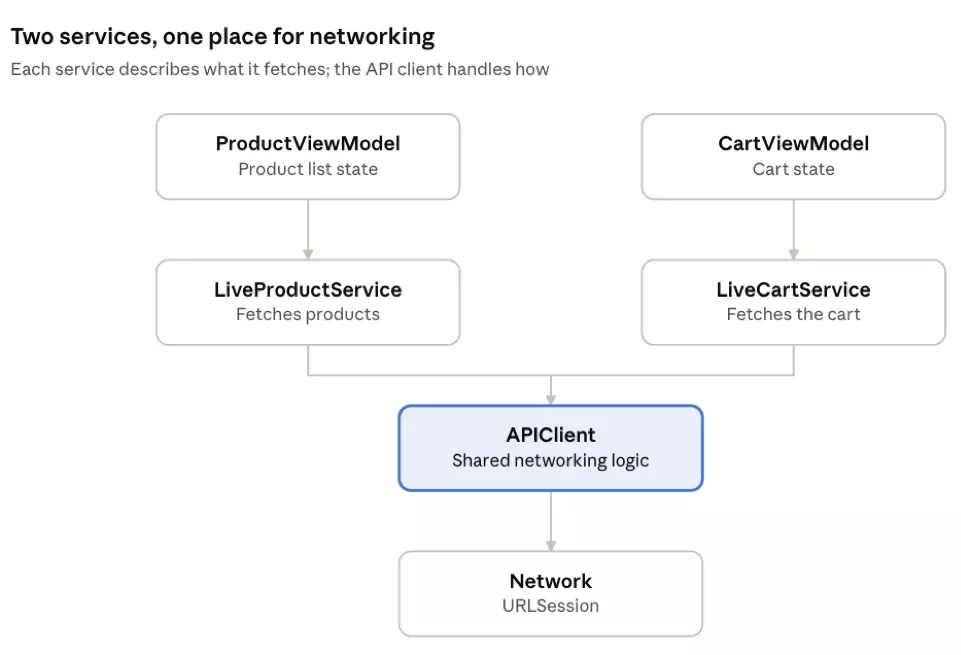
The how now lives in one place. When you add authentication headers or better error handling, you change APIClient, and every service picks it up. Nothing changes for the view models: they still depend on ProductService and CartService, and previews and tests still use the same mocks.
How the Layers Fit Together, and the Names I Use
Now that you’ve seen services, here’s how all the layers fit together. A quick note on naming: words like “view model,” “service,” and “repository” mean different things to different people, and you’ll find other definitions in other articles and codebases. A common one: many people call something a “service” that holds UI state and the methods that change it. In my naming, that’s a view model. If it holds UI state and is @Observable so views can react to it, it’s the UI backing layer, whatever its name says. A service, in contrast, never holds UI state.
This is my take: the split and the names I’ve found most practical in SwiftUI apps.
| Layer | Job | Swift shape |
|---|---|---|
| View | Maps state to pixels, sends user intent | struct conforming to View |
| View model | Owns UI state, mutates it consistently | @MainActor @Observable final class |
| Model | Data and its intrinsic rules | struct |
| Service | Helper worker: stateless functions for shared external dependencies like the network, file system, UserDefaults, or HealthKit. Reusable across view models, easy to mock. | nonisolated struct with @concurrent functions |
| Repository | Mutable state the UI doesn’t observe, like a cache or a token | actor |
The data flow: user taps → view calls a view model method → service works in the background → data comes back → view model updates UI state on the main actor → SwiftUI updates the view.
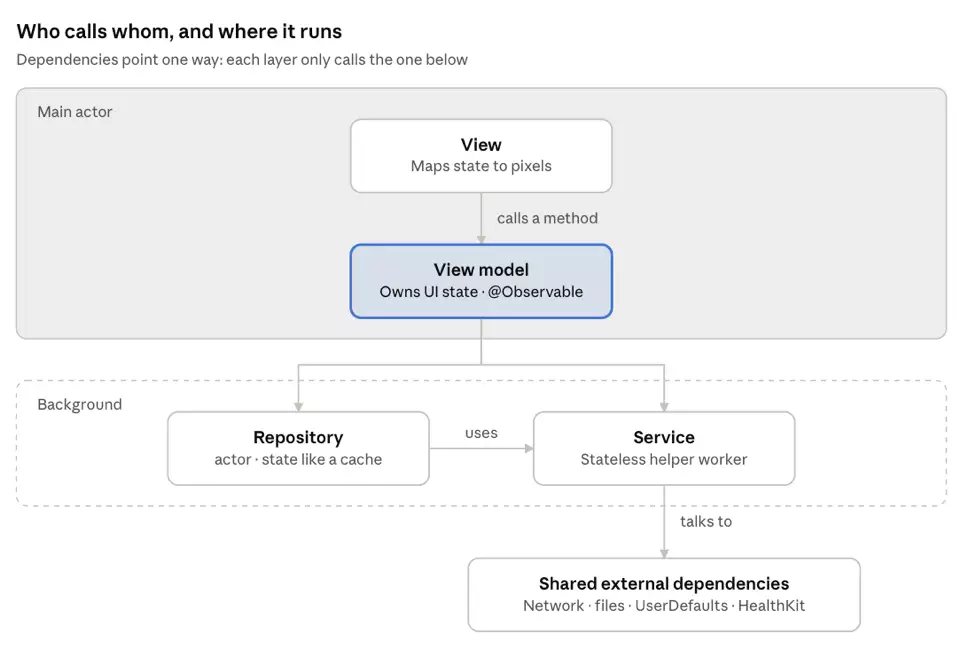
The dependencies point one way: views talk to view models, and view models talk to services. A view never calls a service directly. If it did, the view model’s state would no longer reflect what happened, and the data flow would be hard to follow.
Wrap-Up
We started with a practical goal: view models you can preview and test without touching UserDefaults or the network. The tool that got us there was the Dependency Inversion Principle. The view model depends on a protocol, the live service is the default, and previews and tests pass in a mock.
But testability wasn’t the only thing we gained along the way:
- Reusable components. Services can be shared by several view models, and an
APIClientkeeps networking logic in one place. - Separation of concerns. The view model manages UI state, and the service handles the shared external dependency. Each has one job.
- Clear boundaries. Dependencies point one way, from view to view model to service, so you always know where code belongs and how data flows.
What’s next: in this post, every dependency came in through the initializer. In a real SwiftUI app, the next question is how dependencies get from the app’s entry point to every view model that needs them, especially shared ones. That’s where the SwiftUI environment comes in, and it’s the topic of SwiftUI Dependency Injection: Initializer, Environment, or Container?
Further Reading
- What Is a View Model in SwiftUI, Really?: the definition of the UI backing layer this post builds on.
- What Should Go in a View Model?: how to keep view models focused on one job.
- How I Architect SwiftUI Apps for Swift Concurrency – So the Compiler Stays Quiet: @MainActor, @concurrent, and Sendable: why view models live on the main actor and services run in the background.