

Separation of concerns is the whole reason MVVM exists. Each layer gets one job: the view describes what the user sees, the view model manages the state behind it, and the layers below deal with data and the outside world. When every piece of code sits in the layer whose job it is, you know where to look, changes stay local, and one feature doesn’t break another.
In What Is a View Model in SwiftUI, Really?, we defined the view model’s concern: it owns UI state and is responsible for mutating that state properly and consistently.
But adding a view model doesn’t give you separation of concerns on its own. It just gives you another place to put code. And it’s a very convenient place: it’s already connected to the view, it already has state, so one more property or one more method is always the easiest option. Do that for a few months, and the mess that used to live in your view now lives in your view model. You haven’t separated anything. You’ve moved it.
It goes wrong in the other direction too. Logic that belongs in the view model stays in the view, and the view starts reaching in and changing the view model’s state piece by piece. Or UI code drifts into the view model, and you can no longer find what’s on screen by looking at the view.
So once you’ve decided you need a view model, the real question is where its boundaries are. In this post, I’ll show you how to define a view model’s job, what belongs inside it and what doesn’t, and how to spot code that sits in the wrong layer, with examples from a Markdown app, a product browser, a checkout flow, and an auth flow.
Define the Job: One View Model per Use Case
The first decision isn’t about individual properties. It’s about the boundary of the view model itself. Before you add anything, ask: what is the job of this view model? What is it responsible for? Once that’s clear, you give it all the state, the methods, and the dependencies it needs to do that job, and nothing more.
I think of this as scoping view models by use case: one coherent job around one set of state. The state and the methods that mutate it form a unit. They have a reason to live together. When you start adding a different set of state, with methods that have nothing to do with what’s already there, you’re mixing concerns. The view model loses its cohesion: the things inside it no longer have a logical reason to be in the same place.
Let’s go back to the Markdown app from the previous post. It has two clear use cases:
- Themes: all available themes, which one is selected, and creating, deleting, selecting, and saving them.
- Documents: the list of Markdown documents, and loading, creating, renaming, and deleting them.
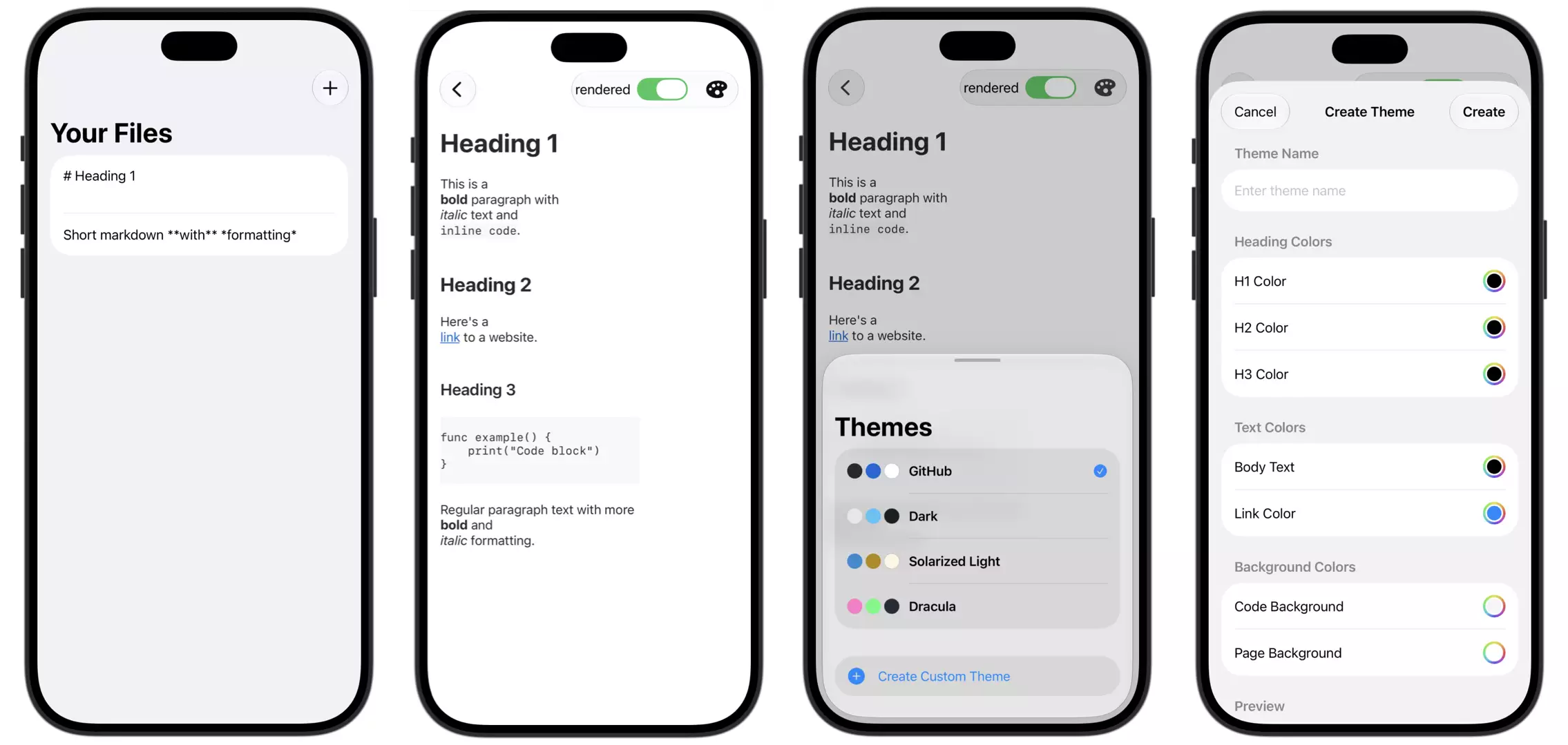
So the app gets two view models, one for each:
@Observable class ThemeStore {
    private(set) var themes: [Theme] = []
    private(set) var selectedThemeID: Theme.ID?

    var selectedTheme: Theme? {
        themes.first { $0.id == selectedThemeID }
    }

    func createTheme(name: String, colors: ThemeColors) async { /* ... */ }
    func deleteTheme(_ theme: Theme) async { /* ... */ }
    func selectTheme(_ theme: Theme) async { /* ... */ }
}

@Observable class DocumentStore {
    private(set) var documents: [MarkdownDocument] = []

    func loadDocuments() async { /* ... */ }
    func createDocument(title: String) async { /* ... */ }
    func renameDocument(_ document: MarkdownDocument, to title: String) async { /* ... */ }
    func deleteDocument(_ document: MarkdownDocument) async { /* ... */ }
}Why not put both into one AppViewModel? Because themes and documents don’t change together. Deleting a document has nothing to do with which theme is selected. Creating a theme has nothing to do with the document list. They’re separate state, with separate mutations, so they live in separate view models.
And here’s the interesting part: both are used on the same screen. The document detail view shows the document’s content and renders it with the selected theme. That’s fine. A view can use more than one view model:
struct ContentView: View {
    @State private var themeStore = ThemeStore()
    @State private var documentStore = DocumentStore()
    @State private var selectedFile: MarkdownFile? = nil

    var body: some View {
        NavigationSplitView {
            MarkdownFilesListView(documentStore: documentStore,
                                  selection: $selectedFile)
        } detail: {
            if let selectedFile {
                MarkdownDetailView(themeStore: themeStore,
                                   markdown: selectedFile)
            } else {
                PlaceholderView()
            }
        }
        .task {
           await themeStore.load()
           await documentStore.load()
        }
    }
}This is also why “one view model per screen” doesn’t work. The MarkdownDetailView screen needs state from two use cases. A single screen view model would either duplicate the theme state, or pull both use cases into one class. The use case decides the boundary, not the screen.
Avoid the God View Model
Think about it this way. If you avoid spaghetti code in your views, but then move everything into one giant view model, you haven’t solved anything. You’ve just moved the mess around. And it’s not a new problem. Whatever separation technique you use, there’s always a risk of creating something massive. UIKit had the infamous massive view controller. In SwiftUI, we can end up with massive views. And we can absolutely end up with massive view models too.
The opposite of a focused view model is the god view model: one huge class that holds everything. Themes, documents, settings, user info, sync status, all in one place, with dozens of methods and a file you scroll forever.
Nobody sets out to write one. It happens one feature at a time. The view model is already there and already connected to the views, so adding “just one more thing” is the easiest option. Repeat that for a few months, and you have a god view model.
Here’s why it hurts:
- Hard to understand: you can’t tell what any part of it is responsible for, or which methods touch which state.
- Changes ripple: a change for one feature can break another, because they share the same class and sometimes the same state.
- Everything depends on everything: every view that uses it is connected to all of it, even the parts it doesn’t need.
- Hard to test: to test one behavior, you have to set up the whole thing.
- Merge conflicts: if everyone on the team works in the same file, you’ll be resolving conflicts constantly.
The fix is the same idea as above: split by use case. Not by line count, and not by screen. If a group of state and the methods that change it form their own job, they get their own view model.
UI State: Collect State That Changes Together
Once you know the use case, the same idea works on a smaller scale. Inside a view model, group the state that changes together.
Loading is the classic example. When DocumentStore loads documents, three pieces of state are involved:
private(set) var isLoading = false
private(set) var errorMessage: String?
private(set) var documents: [MarkdownDocument] = []These always change together. Start loading: set isLoading, clear the error. Success: store the documents, reset isLoading. Failure: set the error, reset isLoading. Every mutation has to remember to update all three correctly. Forget one, and you’re in a state that shouldn’t exist, like a spinner and an error message at the same time.
So at the very least, keep these properties together and change them together in one place. Even better, model them as one value with an enum:
enum LoadingState<Value> {
    case idle
    case loading
    case loaded(Value)
    case failed(String)
}

private(set) var state: LoadingState<[MarkdownDocument]> = .idleNow only valid states are possible, and every transition is a single assignment. The same idea applies elsewhere: form fields belong together with their validation errors, and a selection belongs together with the list it refers to.
What Belongs in a View Model
With the boundaries in place, here’s what actually goes inside.
UI state. The data your views need to render: the list of documents, the selected theme, the loading state, form input.
Derived state. Values that can be calculated from other state should be computed properties, not stored copies. selectedTheme is computed from themes and selectedThemeID. If you stored it as a separate property, you’d have to update it every time either of those changes, and sooner or later you’d forget. Computed properties have nothing to keep in sync. Other examples: canSubmit in a form, formattedTotal in a cart.
Mutations. The methods responsible for changing the state properly and consistently. Creating a theme means adding it, selecting it, and saving, every time, in that order. That sequence lives in one method, so no view has to know about it.
Display formatting. Turning raw data into something ready to show: a formatted price, a relative date, a title combined from several fields. This is about what to show. How it looks is still up to the view.
Gatekeeping. Answering “is this action allowed right now?” as state, for example canSubmit or canDeleteTheme. The view model decides whether something is allowed. The view decides that “not allowed” means a disabled button.
Dependencies. The services the view model needs to do its job, like the file service for ThemeStore or a networking service for loading products. The view model calls them. It doesn’t do their work itself.
What Doesn’t Belong (and Where It Goes)
Just as important is what stays out. Each of these has a better home. This is my personal recommendation that is clear and relatively straightforward to follow.
Layout, styling, and any UI code → the view. Fonts, colors, spacing, animations, which view to show for which state. The view model never says “show a red label here,” and it never contains view code itself. More on that in the next section.
Data structures and intrinsic rules → the model. A Theme struct, a MarkdownDocument, the rule for what makes a valid email address or a maximum cart quantity. These rules belong to the data itself, no matter which view model uses them.
State from another use case → another view model. Even if a view needs it. The document detail view needs the selected theme, but that doesn’t mean the theme belongs in DocumentStore. The view simply uses both.
Services: The Layer Behind the View Model
A view model’s job is managing UI state. But to do that job, it often needs things outside your own code: the network, the file system, UserDefaults, the Keychain, HealthKit. These are shared external dependencies, and working with them is a different job. So that work goes into a service.
A service is a helper worker:
- Stateless: plain functions that do one kind of work, like fetching products or saving themes.
- Off the main actor: heavy work like requests and decoding doesn’t block the UI.
- Reusable: the same API call can serve several view models, like the cart and checkout.
- Replaceable: the view model depends on a protocol, so you can inject a mock for previews and tests.
The view model keeps the state and decides when to call the service. The service does the work and returns the data. I go deeper into services, repositories, and dependency injection in a separate blog post.
Navigation: Coordinators for Presentation State
Simple navigation stays in the view: the user taps a product, and a detail view is pushed. But sometimes logic decides where to go.
Say a shopping app checks for discount offers when the user opens the shop. If the server returns an offer, a sheet should open. That’s three concerns at once:
- Fetching the offers is networking → a service.
- Holding the offers is UI state → the view model.
- Opening the sheet is presentation state → neither of them.
Presentation state gets its own owner: a coordinator. It’s an @Observable class that owns the navigation path and which sheet is shown. It holds only state, never view code. The view model decides that the offer should be shown and tells the coordinator; the view maps the coordinator’s state to the actual sheet.
Coordinators pay off in larger, more complex apps, especially when several developers work on different features. And there, they should always be nested: an app coordinator for the top-level flows, and a child coordinator per feature, like shop or checkout. A single coordinator for the whole app turns into the same god object we just got rid of: it knows every screen, every feature depends on it, and every change touches it. With nested coordinators, each flow owns only its own navigation. The concerns stay separated, dependencies stay local, and features are easy to split into modules.
This pattern is often called MVVM-C, and there are different ways to implement it. I cover how I use it in detail in another blog post: Navigation with Coordinators.
Going Too Far: UI Code in a View Model
It’s possible to swing too far in the other direction, and move things into the view model that clearly belong in the view. The most extreme version is putting actual view code into it.
Imagine an AuthManager with three states: loading, an error, or a logged-in user. Now we add a @ViewBuilder function that returns the screen for each state:
@MainActor
@Observable
final class AuthManager {
    private(set) var state: AuthState = .loading

    @ViewBuilder
    func screenComponent() -> some View {
        switch state {
        case .loading: ProgressView()
        case .failed(let message): Text(message)
        case .loggedIn(let user): Text("Welcome, (user.name)")
        }
    }
}

struct HomeView: View {
    let authManager: AuthManager

    var body: some View {
        authManager.screenComponent()
            .padding()
    }
}This works. But the view is now “unemployed.” It’s just an empty container that does nothing. And that causes real problems:
- You can’t find your UI. Open
HomeView, and you can’t tell what’s on screen. If someone asks you to make the welcome text bold, it’s not there. You jump toAuthManager, look through the cases, figure out which one to change, and bounce between files for a one-line UI tweak. - Reusability drops. Before, the coupling went one way: the view knew about the view model. Now the view model also knows how the UI looks. If you want the same auth logic with a different design somewhere else, you can’t, because the UI is baked into the observable.
- Testing gets hard. Testing a normal view model is easy: is the state loading, yes or no? Testing a function that returns
some Viewmeans dealing with SwiftUI’s opaque types, a deeply nestedConditionalContenttype that’s hard to assert on, and possibly spinning up SwiftUI just to run a unit test.
So here’s my rule that’s simple enough to actually follow: no UI code in your view models. No some View, no @ViewBuilder, nothing that describes how to draw pixels.
That gives each side a clear job:
- The view maps state to pixels. It decides what to show for a given state and how to style it.
- The view model manages what state the app is in. It handles the data, the logic, the service calls, and the state transitions. If a request fails with a “forbidden” error, the view model stores that error. Whether it shows up as an alert, an inline message, or a banner is the view’s decision.
With that rule, the switch moves back where it belongs:
struct HomeView: View {
    let authManager: AuthManager

    var body: some View {
        switch authManager.state {
        case .loading:
            ProgressView()
        case .failed(let message):
            Text(message).foregroundStyle(.red)
        case .loggedIn(let user):
            Text("Welcome, (user.name)").font(.title)
        }
    }
}Now everything you see on screen is in the view, and AuthManager is back to being a plain class you can test with simple assertions.
Example: What Stays Out of a Product Browser
Let’s put this into practice with a product browser. You can search through a list of products and apply filters to narrow down the results. There are network requests, filtering logic, loading states, and error handling, so all of that moves into a ProductViewModel.
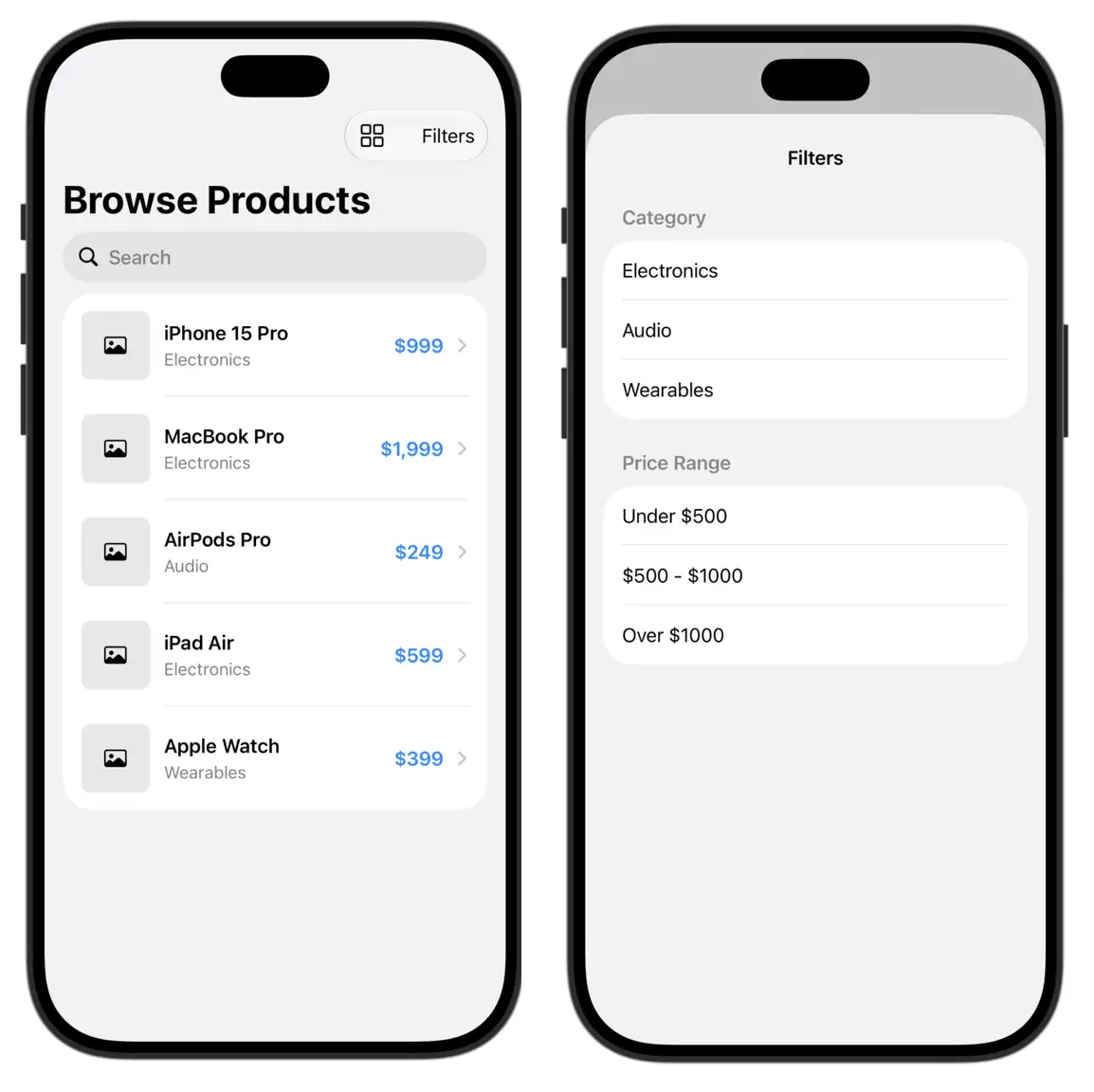
First, define the job. This view model fetches products, updates the list when the search or filter changes, manages the loading state, and keeps an error message the UI can show. To do that job, it needs the search query, the selected filter, the methods that perform the fetch, and the service that does the network request in the background:
@MainActor
@Observable
final class ProductViewModel {
    var searchQuery = ""
    var selectedFilter: ProductFilter = .all
    private(set) var state: LoadingState<[Product]> = .idle

    private let productService: ProductService

    func fetchProducts() async { /* ... */ }
}That’s it. Now the interesting part is what I deliberately kept in the view:
struct ProductBrowserView: View {
    @State private var viewModel = ProductViewModel()
    @State private var isFilterSheetShown = false
    @State private var isGridLayout = true
    @State private var path = NavigationPath()

    // ...
}- Whether the filter sheet is shown. Does the view model need to know a sheet is open to fetch products? No. It cares about which filter is selected, not whether the UI for choosing it is visible.
- Grid or list layout. A display preference. It has nothing to do with fetching or managing products.
- The navigation path. Does the view model need to know the user tapped through to a detail screen? No. If the detail screen needs more data, that’s a different job, with a different lifetime, and only needed once the user is actually there.
All three are about what’s currently on screen: display state, navigation state, interaction state. They have a different concern than the view model’s job, so they stay in the view.
Example: When Logic Should Move In
The opposite happens too: code that lives in the view but belongs to the view model’s job.

Say a shopping app has a checkout flow. A CheckoutViewModel loads the final cart so the user can review it: the items, subtotal, discount, shipping, taxes, and total. Its job is to manage those totals.
Then a new feature request comes in: the user should be able to enter a promo code. In a first version, the promo code logic lives in the view. To make that work, the view model’s totals have to be settable from outside:
@MainActor
@Observable
final class CheckoutViewModel {
    var subtotal: Decimal = 0
    var discount: Decimal = 0
    var shipping: Decimal = 0
    var taxes: Decimal = 0
    var total: Decimal = 0
    // ...
}And the view does the work:
struct CheckoutView: View {
    var checkoutViewModel: CheckoutViewModel
    @State private var promoCode = ""
    @State private var promoError: String?

    var body: some View {
        Form {
            CartSummarySection(checkoutViewModel: checkoutViewModel)
            Section("Promo Code") {
                TextField("Enter code", text: $promoCode)
                if let promoError {
                    Text(promoError).foregroundStyle(.red)
                }
                Button("Apply") { applyPromoCode() }
            }
        }
    }

    // ⚠️ Business logic in the view
    private func applyPromoCode() {
        guard promoCode == promoCode.uppercased() else {
            promoError = "Promo codes use capital letters only."
            return
        }

        if promoCode == "SAVE10" {
            // Reads subtotal, changes discount...
            checkoutViewModel.discount = checkoutViewModel.subtotal * 0.1
            // ...then reads three more values to change total
            checkoutViewModel.total = checkoutViewModel.subtotal
                - checkoutViewModel.discount
                + checkoutViewModel.shipping
                + checkoutViewModel.taxes // ⚠️ taxes were calculated before the discount
            promoError = nil
        } else {
            promoError = "This code isn't valid."
        }
    }
}Look at what applyPromoCode() does with the view model. It reads subtotal, changes discount, then reads subtotal, discount, shipping, and taxes again to change total. The view has to know how the totals depend on each other, and it gets it wrong: the taxes were calculated on the old subtotal, so the user sees a wrong total. And the valid codes are hardcoded in the view, when only the server knows which codes exist.
That’s the code smell to watch for: if your view reads one property from the view model, changes another, then reads a third, it’s working with the view model’s internals. That’s a sign the view is handling a responsibility that belongs to the view model.
And look at the job again: managing the totals. Applying a promo code is part of that job. So it moves in, behind a single method. The server validates the code and returns the recalculated cart, and the view model updates all totals together:
@MainActor
@Observable
final class CheckoutViewModel {
    private(set) var items: [CartItem] = []
    private(set) var subtotal: Decimal = 0
    private(set) var discount: Decimal = 0
    private(set) var shipping: Decimal = 0
    private(set) var taxes: Decimal = 0
    private(set) var total: Decimal = 0

    private(set) var isApplyingPromoCode = false
    private(set) var promoCodeError: String?

    private let cartService: CartService

    init(cartService: CartService) {
        self.cartService = cartService
    }

    func loadCart() async {
        // Fetch the final cart and call update(with:)
    }

    func applyPromoCode(_ code: String) async {
        isApplyingPromoCode = true
        promoCodeError = nil
        defer { isApplyingPromoCode = false }

        do {
            // The server validates the code and returns recalculated totals
            let cart = try await cartService.applyPromoCode(code)
            update(with: cart)
        } catch {
            promoCodeError = "This promo code isn't valid."
        }
    }

    // All totals change together, in one place
    private func update(with cart: Cart) {
        items = cart.items
        subtotal = cart.subtotal
        discount = cart.discount
        shipping = cart.shipping
        taxes = cart.taxes
        total = cart.total
    }
}The totals are private(set) again, so no view can change one without the others. The view just hands off the code and shows the state:
Button("Apply Promo Code") {
    Task { await checkoutViewModel.applyPromoCode(promoCode) }
}
.disabled(checkoutViewModel.isApplyingPromoCode)Notice that promoCode stays in the view as @State. It’s plain text input that only this view uses, until the user taps Apply. What moved is the logic that changes the totals.
And there’s a bonus: if promo codes can be applied in several places in the app, that logic now lives in one place instead of being duplicated across views.
A Quick Checklist
When you’re about to add something to a view model, run through these questions:
- What’s the job of this view model? Does the new code belong to that job? If it’s part of a different job, it belongs in a different view model.
- Does it own or change UI state? If not, move it to the view, the model, or a service.
- Is it UI code? No
some View, no@ViewBuilder. That stays in the view. - Does it change together with the rest of the state here? If yes, keep it close, and update it in the same place.
- Can it be derived instead of stored? Then make it a computed property.
- Are several related properties really one state? Then consider modeling them as one enum.
- Is the view reaching into several view model properties to make one change? Then that logic belongs in the view model, behind a single method.
Wrapping Up
A good view model is focused. It has one clear job, holds the state that changes together, and is responsible for mutating that state properly and consistently. Everything else has a better home: UI code and display state in the view, rules in the model, heavy work in services, and other jobs in their own view models.
This isn’t a decision you make once. As your app grows and new features arrive, keep asking whether new code belongs to an existing view model’s job. Sometimes logic needs to move out, like the filter sheet in the product browser. Sometimes it needs to move in, like the promo code in checkout. The line stays the same: the view model manages state and logic, and the view maps that state to what the user sees.