Dependency injection means the view model gets its dependencies from outside, and whoever creates the view model decides which service to pass. In SwiftUI, that “whoever” is usually a view. So where does the view get the service from, and how can a preview give it a mock instead?
In this post, I’ll show how dependency injection in SwiftUI works as an app grows, with one example that goes from a single screen to a full app. Passing the service through the view’s initializer works for a single screen, but breaks down once the screen is used inside other views. That’s why I put services into the SwiftUI environment, which also makes previews and UI tests easier.
Starting Simple: Passing the Service Through the View’s Initializer
First, the setup. It’s the same as in Dependency Injection in Swift: a protocol for the service, a live implementation, a mock, and a view model that gets the service through its initializer. You can read how to set this up in more detail in this blog post.
nonisolated protocol ProductService: Sendable {
    func fetchProducts() async throws -> [Product]
}

nonisolated struct LiveProductService: ProductService {
    @concurrent
    func fetchProducts() async throws -> [Product] { /* request, decode */ }
}

nonisolated struct MockProductService: ProductService {
    var products: [Product] = []

    func fetchProducts() async throws -> [Product] { products }
}

@MainActor
@Observable
final class ProductViewModel {
    private(set) var state: LoadingState<[Product]> = .idle
    private let productService: ProductService

    init(productService: ProductService) {
        self.productService = productService
    }

    func load() async {
        state = .loading
        do {
            state = .loaded(try await productService.fetchProducts())
        } catch {
            state = .failed("Couldn't load products.")
        }
    }
}We start with a single screen that shows the products. The view creates its view model in @State, and the service is written right there:
struct ProductsScreen: View {
    @State private var viewModel = ProductViewModel(productService: LiveProductService())

    var body: some View {
        ProductListView(state: viewModel.state)
            .task { await viewModel.load() }
    }
}

#Preview {
    ProductsScreen() // calls the real API
}The view model itself is fine: it takes a protocol in its initializer. But the view hard-codes which service to pass, so the preview always calls the real API. Without a network connection, it shows an error; with a slow one, a spinner.
The fix is the same idea one level up: the view gets the service through its own initializer. The live service is the default, so nothing changes for the rest of the app:
struct ProductsScreen: View {
    @State private var viewModel: ProductViewModel

    init(productService: ProductService = LiveProductService()) {
        _viewModel = State(initialValue: ProductViewModel(productService: productService))
    }

    var body: some View {
        ProductListView(state: viewModel.state)
            .task { await viewModel.load() }
    }
}

#Preview {
    ProductsScreen(productService: MockProductService(products: Product.samples))
}- The app keeps calling
ProductsScreen(). Only the preview passes the mock. _viewModel = State(initialValue:)sets the initial value of the@Stateproperty from insideinit. The underscore accesses the property wrapper itself instead of the wrapped value.- The initial value is only used the first time. SwiftUI keeps the first view model for as long as the view is on screen. If the parent later re-creates
ProductsScreenwith a different service, the new one is ignored. - Keep the view model’s
initcheap. Every time the parent re-creates theProductsScreenstruct, thisinitruns and creates a newProductViewModel, which SwiftUI then throws away. That’s fine as long as the initializer only stores its dependencies and doesn’t start any work.
This works as long as the screen is only previewed on its own. As you’ll see next, it breaks down as soon as the screen is used inside other views.
Why Initializer Injection Breaks Down as the App Grows
Now the app grows. ProductsScreen becomes one tab in a RootTabView, next to a FavoritesScreen that works the same way:
struct RootTabView: View {
    var body: some View {
        TabView {
            Tab("Products", systemImage: "bag") {
                ProductsScreen()      // default: live service
            }
            Tab("Favorites", systemImage: "heart") {
                FavoritesScreen()     // default: live service
            }
        }
    }
}

#Preview {
    RootTabView() // both tabs use the real API and the real UserDefaults
}The preview of ProductsScreen still works, because it passes the mock itself. But the preview of RootTabView creates both screens with their defaults, the live services. There’s no way to reach in and change that from the outside.
With initializer injection, the only fix is to pass the services through the parent:
struct RootTabView: View {
    let productService: ProductService     // not used here, only passed on
    let favoritesService: FavoritesService // not used here, only passed on

    var body: some View {
        TabView {
            Tab("Products", systemImage: "bag") {
                ProductsScreen(productService: productService)
            }
            Tab("Favorites", systemImage: "heart") {
                FavoritesScreen(favoritesService: favoritesService)
            }
        }
    }
}

#Preview {
    RootTabView(
        productService: MockProductService(products: Product.samples),
        favoritesService: MockFavoritesService()
    )
}This works for one level. Here’s how it gets worse as the app grows:
RootTabViewtakes dependencies it doesn’t use. It only has the services so it can pass them to its children.- Every new level adds the same parameters. If
ProductsScreenshows aProductDetailScreenwith its own view model,ProductsScreenalso needs to pass the service on, even though its own view model already has one. - Every new service adds a parameter to every view in the chain. Add a cart service, and
RootTabView,ProductsScreen, and every view in between get another parameter. - Every view above needs this to be previewable. If one view in the chain uses the default instead of passing the service on, every preview above it calls the real API again.
That’s why I don’t pass services through view initializers. I prefer to put them into the environment.
The Solution: Services in the SwiftUI Environment
The environment solves exactly the problem from the previous section. A value set on a view reaches every view below it, and none of the views in between need to know about it.
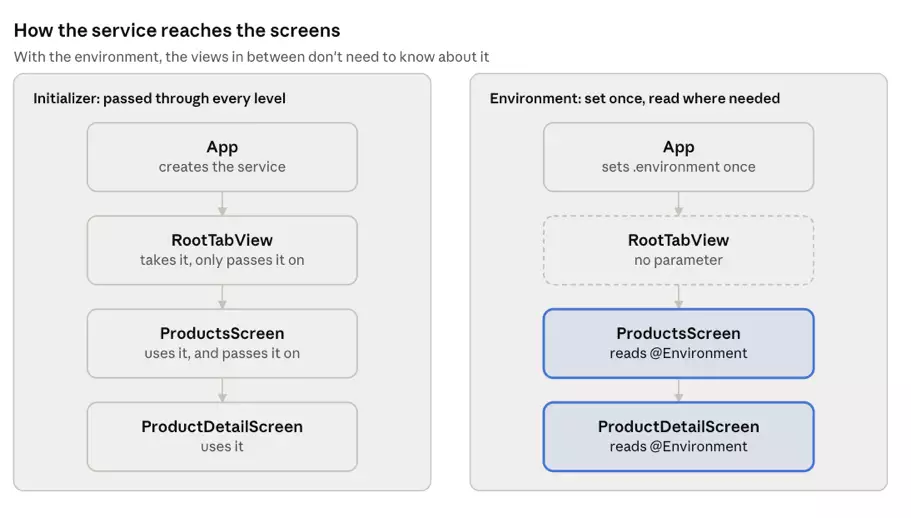
Put the service into the environment
With the @Entry macro, this is one line per service in an extension on EnvironmentValues:
extension EnvironmentValues {
    @Entry var productService: ProductService = LiveProductService()
    @Entry var favoritesService: FavoritesService = LiveFavoritesService()
}- The type is the protocol. If it were
LiveProductService, you couldn’t put a mock in its place. - The default is the live service. If nobody sets a value, every view gets the live service, so the app works without any setup at the root.
- A live default is safe here because the services are stateless
nonisolatedSendablestructs. Without an injected value, SwiftUI may create the default more than once, and for a stateless service, extra copies change nothing.
Read it and create the view model
The screen reads the service with @Environment. The environment isn’t available yet when the view’s init runs, so the view model can’t be created there anymore. Instead, it’s an optional and gets created in .task:
struct ProductsScreen: View {
    @Environment(.productService) private var productService
    @State private var viewModel: ProductViewModel?

    var body: some View {
        Group {
            if let viewModel {
                ProductListView(state: viewModel.state)
            } else {
                ProgressView()
            }
        }
        .task {
            if viewModel == nil {
                viewModel = ProductViewModel(productService: productService)
            }
            await viewModel?.load()
        }
    }
}.taskruns every time the view appears, for example when the user switches back to this tab. Theif viewModel == nilcheck makes sure the view model is only created the first time.- The view model is created exactly once.
RootTabView goes back to having no parameters at all:
struct RootTabView: View {
    var body: some View {
        TabView {
            Tab("Products", systemImage: "bag") {
                ProductsScreen()
            }
            Tab("Favorites", systemImage: "heart") {
                FavoritesScreen()
            }
        }
    }
}Override it where you need a different service
Now one modifier on any view replaces the service for everything below it:
#Preview("Root") {
    RootTabView()
        .environment(.productService, MockProductService(products: Product.samples))
        .environment(.favoritesService, MockFavoritesService())
}

#Preview("Products") {
    ProductsScreen()
        .environment(.productService, MockProductService(products: Product.samples))
}It doesn’t matter how deep ProductsScreen sits in the hierarchy. The override on the parent preview reaches it. You only set it on the views that need a different service: in previews, or on one part of the app that should use another service.
Variant: keep the view model non-optional
If you don’t want the optional view model, there’s a middle way. ProductsScreen keeps its initializer from the first example, and the view that shows it reads the environment and passes the service in:
struct RootTabView: View {
    @Environment(.productService) private var productService
    @Environment(.favoritesService) private var favoritesService

    var body: some View {
        TabView {
            Tab("Products", systemImage: "bag") {
                ProductsScreen(productService: productService)
            }
            Tab("Favorites", systemImage: "heart") {
                FavoritesScreen(favoritesService: favoritesService)
            }
        }
    }
}ProductsScreenstays as simple as in the first example, with a non-optional view model.- Only the parent touches the environment, and an override on its preview still reaches both tabs.
- The caveats from the first example come back: the initial value is only used the first time, and the view model’s
initmust stay cheap.
Why This Matters for UI Tests
The same property pays off again in UI tests. A UI test runs the app in a separate process, so it can’t pass a mock into a view. All it can do is launch the app with arguments.
With initializer injection, the app would have to pass the mock down every chain of views to every screen. With the environment, the app reads the argument and sets the mock once, wherever it should apply. Here it’s set at the root, for the whole app:
@main
struct ShopApp: App {
    private let productService: ProductService

    init() {
        if ProcessInfo.processInfo.arguments.contains("-uiTesting") {
            productService = MockProductService(products: Product.samples)
        } else {
            productService = LiveProductService()
        }
    }

    var body: some Scene {
        WindowGroup {
            RootTabView()
                .environment(.productService, productService)
        }
    }
}Every screen in the app picks up the mock, and none of them knows it’s running in a UI test. How the test passes the launch argument, and how to set up different scenarios, is the topic of UI Testing SwiftUI Apps With Mock Services.
If only one feature should use the mock, set the same .environment on that feature’s view instead, like the products tab. Everything in that branch gets the mock, and the rest of the app keeps the live service.
Keeping Previews Safe
The live default has one downside. If a preview forgets the override, nothing tells you: the preview uses the live service and calls the real API. With one service that’s easy to remember. With several, every preview has to override every one of them.
A small view extension collects all mocks in one place:
extension View {
    func injectMockServices() -> some View {
        self
            .environment(.productService, MockProductService(products: Product.samples))
            .environment(.favoritesService, MockFavoritesService())
    }
}

#Preview {
    RootTabView()
        .injectMockServices()
}When you add a new service, you add its mock here once, and every preview that uses injectMockServices() gets it.
To use a live service for one preview and mocks for everything else, set the specific value before the modifier:
#Preview("Real Product API") {
    RootTabView()
        .environment(.productService, LiveProductService()) // must come before injectMockServices()
        .injectMockServices()
}The order matters because environment values set closer to the view win. The .environment call directly on RootTabView is applied innermost, so it overrides the value that injectMockServices() sets further out.
The Alternative: DI Containers Like Factory
The environment works, but it has a cost. Every screen now has an @Environment property, an optional @State view model, a .task that creates it, and a nil case to handle. With a handful of screens, that’s fine. With many, it’s the same few lines over and over. That’s usually why people reach for a DI container. One of the most popular one in Swift is Factory.
Another option is Point-Free’s swift-dependencies, which takes a similar approach with a @Dependency property wrapper, and is built around task-local values from the start.
What Factory automates
Each dependency is registered once, in an extension on Factory’s Container. The view model then resolves it with the @Injected property wrapper:
import Factory

extension Container {
    var productService: Factory<ProductService> {
        self { LiveProductService() }
    }
}

@MainActor
@Observable
final class ProductViewModel {
    @ObservationIgnored
    @Injected(.productService) private var productService

    private(set) var state: LoadingState<[Product]> = .idle

    func load() async { /* ... */ }
}The main win: a simpler view
Compare the screen with the environment version from above. With Factory, the view model gets its service on its own, so the view just creates it:
struct ProductsScreen: View {
    @State private var viewModel = ProductViewModel()

    var body: some View {
        ProductListView(state: viewModel.state)
            .task { await viewModel.load() }
    }
}No @Environment property, no optional view model, no nil case, and no creating the view model in .task. And that’s on every screen.
Overrides for previews
Instead of .environment overrides, you register a different version. Here are the same examples as above, with Factory.
The parent preview:
#Preview {
    let _ = Container.shared.productService.register {
        MockProductService(products: Product.samples)
    }
    RootTabView()
}Resolving the whole dependency graph
The bigger benefit shows up when dependencies depend on each other. The view model needs a product service, the service needs an APIClient, and the APIClient needs the token store that holds the current auth token. Without a container, someone has to create all of these in the right order and pass each one into the next.
With Factory, each dependency is registered once, together with what it needs:
extension Container {
    var tokenStore: Factory<TokenStore> {
        self { LiveTokenStore() }.singleton
    }

    var apiClient: Factory<APIClient> {
        self { APIClient(tokenStore: self.tokenStore()) }
    }

    var productService: Factory<ProductService> {
        self { LiveProductService(apiClient: self.apiClient()) }
    }
}When the view model asks for productService, Factory resolves the whole chain. .singleton makes sure the whole app shares one token store. How to build the same graph without a framework is the topic of Building the Dependency Graph in SwiftUI.
Where it gets harder
- Parallel tests. Registrations live in one shared container, so tests that run at the same time can overwrite each other’s mocks. To keep them separate, each test gets its own container through a
@TaskLocal. The drawback is making that work reliably: task-local values only reach code that runs inside the test’s task. Point-Free put a lot of work into this in their swift-dependencies library, and I’m still not sure I’d catch every case. I’d rather not spend my time hunting test failures that only show up sometimes. - Hidden dependencies. Dependencies no longer show up in the initializer. Nothing reminds you to register a mock, so it’s easy to forget one, for example in a preview, and silently call the live service.
- Multi-window apps. Factory’s scopes are app-wide, not per window. A repository, an object that holds state below the UI like an image cache, is shared by every window if it’s a singleton. On iPad and Mac, each window often needs its own repository, with its own cache or selection, while the token store stays one per app. With the environment, this comes for free: each window has its own view tree, so a repository created inside the
WindowGroupcontent exists once per window. With Factory, you need a custom scope or have to pass a window identifier around. More on per-window lifetimes in Building the Dependency Graph in SwiftUI.
My take
I show DI frameworks as an option, not a recommendation. They look easy at the start: register a dependency, add @Injected, done. The problems come later. If the scopes and overrides aren’t set up right, you get shared state you didn’t expect, like the multi-window case above, and the dependencies no longer show up in the initializer. And once the whole app resolves its dependencies through the framework, moving away from it means touching every view model.
The initializer and environment approach needs more code, but it’s plain Swift and SwiftUI that you can read, understand, and change.
Outlook: MVVM-C
There’s one more way to look at this. With coordinators, views no longer create their view models at all. The coordinator builds each view model with plain initializer injection and passes the dependencies from parent to child coordinator. That replaces most of the environment setup from this post, and gives per-window instances with one coordinator per window.
That’s a bigger topic, so it gets two posts of its own: MVVM-C in SwiftUI: Why, What, and How, and Dependency Injection With MVVM-C.
Summary
| Approach | Verdict |
|---|---|
Service through the view’s init | Works for a single screen, breaks down once the screen is used inside other views |
| Service in the environment | What I use: reaches screens at any depth, and one override switches previews and UI tests to mocks |
| DI container like Factory | An option, with trade-offs: parallel tests, hidden dependencies, and multi-window apps |
There’s also a limit. Everything in this post works because the services are stateless, so a live default and extra copies are harmless. A token store or a repository with a cache holds state, and there a live default would quietly create a second instance. Where and how to create those is the topic of Building the Dependency Graph in SwiftUI.